
.png)
A Practical Guide to Project Management for Web Development

Let's be honest, project management for web development isn't just about Gantt charts and deadlines. It's the art and science of guiding a website from a spark of an idea to a fully functional, live product—without losing your mind, your budget, or your team along the way. Think of it as the blueprint that keeps the whole build from turning into chaos.
Why Web Development Projects Fail and How to Prevent It
It’s a story I’ve seen play out too many times: a web project kicks off with tons of excitement, only to slowly drift into a painful mix of missed deadlines, blown budgets, and a final result that just doesn't hit the mark. This isn't just bad luck. It’s almost always a symptom of deeper, structural problems.
Most of these failures can be traced back to a few usual suspects. Vague briefs, messy communication, and goals that are never truly defined create a shaky foundation. When your team is left guessing, you’re practically inviting endless rework and frustrating delays.
The Real Cost of Poor Planning
The stats out there are pretty grim. Research from Harvard Business Review suggests only 35% of projects actually finish on time, on budget, and hit all their goals. In the web world, where we see over 250,000 new sites go live every day, sloppy project management is the number one reason things go south. It’s the direct cause of scope creep in 40% of cases, a problem that can devour nearly half of a project's budget.
A solid project management for web development framework isn't just bureaucratic fluff; it’s your best defense against becoming another statistic. It turns a high-stakes gamble into something you can actually control.
When you establish clarity, define your scope, and lock in transparent communication from day one, you’re building a project that can actually handle the inevitable curveballs.
Common Failure Points to Address Early
Spotting the roadblocks before you hit them is half the battle. I've found that most derailed projects fall victim to one of these three culprits:
Unclear Scope and Objectives: This is the big one. If stakeholders can't agree on what "done" actually looks like, the goalposts will just keep moving. This is where scope creep is born. We've got a whole guide on this, so check out our key strategies to avoid scope creep: https://www.justbeepit.com/post/how-to-avoid-scope-creep-key-strategies-for-success.
Ineffective Communication: Relying on a tangled mess of emails and marathon meetings for feedback is a recipe for disaster. Important details get lost in the noise, leaving developers to make their best guess—which often leads to errors and rework.
Poor Risk Management: Every project faces potential risks, whether it's a technical hurdle nobody saw coming or a key team member leaving unexpectedly. Proactively identifying these risks is non-negotiable, and learning about mastering software project risk management is a great place to start.
Tackle these issues head-on from the get-go, and you’ll build a foundation for success instead of one that's doomed to fail.
Building a Bulletproof Project Foundation
A great web development project doesn’t just magically happen when a developer starts coding. Nope. It all begins way before that, in what I like to call the foundation phase. Think of it like building a house: if your foundation is cracked or shaky, everything you build on top is doomed to fail. This is your chance to get ahead of scope creep and set your team up for a big win.
The real goal here is to transform a fuzzy idea into a solid, actionable plan. That means getting crystal-clear on the objectives, figuring out every single person who gets a say (the stakeholders), and nailing down a budget that’s based in reality, not wishful thinking.
Defining Your Project’s North Star
Every project needs a "North Star"—a single, undeniable goal that guides every single decision down the line. Is this new website supposed to rake in leads, sell products, or just look pretty and build the brand? Without that clarity, you'll have your team pulling in ten different directions. It gets messy fast.
Start by asking the right questions to dig up the real business objective. Don't just ask, "What do you want?" That's a recipe for disaster. Instead, try, "What problem are we solving with this?" This simple shift changes the entire conversation from a list of features to a discussion about measurable results. For example, a vague request for a "blog section" suddenly becomes a concrete goal to "increase organic traffic by 20% in six months." See the difference?
A project without clearly defined objectives is just a collection of tasks. The objective provides the purpose, turning random activities into a coordinated effort toward a specific business result.
Once you’ve got that core goal locked down, you can build out a detailed project scope. This document needs to be ruthless—it should state exactly what’s included and, just as importantly, what is not included. Trust me, this one step is your best weapon against scope creep later.
Identifying Stakeholders and Managing Expectations
One of the biggest mistakes I see is assuming the client is the only stakeholder. In reality, stakeholders are everywhere: your design team, your developers, the marketing folks, maybe even the sales team. Anyone whose work touches the project needs to be on your radar from day one.
After you've identified them, the real work starts: managing their expectations. Every stakeholder brings their own baggage and priorities to the table. The marketing team is obsessed with SEO and lead forms, while the design team is laser-focused on user experience and brand guidelines. As the project manager, your job is to be the diplomat who aligns all these competing interests with the project's North Star.
Solid communication is your best friend here. Set up a clear communication plan that spells out:
Who gets project updates.
What kind of information they’ll get.
When and how often you'll update them.
This structure stops the "too many cooks in the kitchen" chaos and makes sure the feedback you get is actually useful.
Choosing Your Project Management Methodology
Okay, so your objectives are clear and you know who's involved. Now it's time to pick the framework that will guide the day-to-day grind. The methodology you choose will shape how your team plans, builds, and adapts. For web dev projects, it usually boils down to three main players: Agile, Scrum, and Kanban.
Each has its own rhythm and structure, and the right one for you really depends on your team’s size, how complex the project is, and how involved your client wants to be. There isn't a magic "best" option—only what’s best for your situation. Choosing the right Webflow project management tools is also a huge part of making any methodology work smoothly.
To help you figure out which path to take, I've put together a quick comparison.
Choosing Your Web Development Project Methodology
Picking the right framework is crucial for keeping your web development projects on track. This table breaks down the differences between Agile, Scrum, and Kanban to help you decide which one fits your team and project best.
Methodology | Best For | Key Principles | Pros | Cons |
|---|---|---|---|---|
Agile | Projects with evolving requirements where flexibility and client collaboration are key. | Iterative development, continuous feedback, and adaptive planning. | Highly flexible, better client satisfaction, improved quality. | Can be less predictable on timelines and budget. |
Scrum | Complex projects that can be broken into smaller, manageable sprints (1-4 weeks). | Time-boxed sprints, daily stand-ups, and defined roles (Scrum Master, Product Owner). | Increased transparency, predictable delivery cycles, team accountability. | Can be rigid; scope creep within a sprint is discouraged. |
Kanban | Teams that need a visual way to manage continuous workflow and identify bottlenecks. | Visualizing workflow on a board, limiting work in progress (WIP), and continuous flow. | Improves workflow efficiency, very flexible, reduces wasted time. | No set timeframes can make long-term planning difficult. |
A small agency building a simple brochure site might kill it with the visual flow of Kanban. On the flip side, a large team building a complex web app will probably get more out of the structured, sprint-based rhythm of Scrum.
The main takeaway here is to consciously choose your methodology instead of just stumbling into old habits. This deliberate choice is what solidifies your project's foundation, giving you a clear and repeatable path to launch.
Turning Your Project Plan Into Action
Okay, you’ve got a solid foundation. Now for the fun part—turning that high-level strategy into the day-to-day rhythm of your development team. This is where the magic happens, bridging the gap between a great plan and a great website. It all starts with translating those big ideas into small, manageable chunks of work.
If you don't get this right, you'll feel it later. A feature like "user authentication" isn't a single task; it’s a whole collection of smaller, interconnected jobs that need to be carefully lined up. Breaking it all down ensures nothing slips through the cracks and gives you a much more realistic picture of the effort involved.
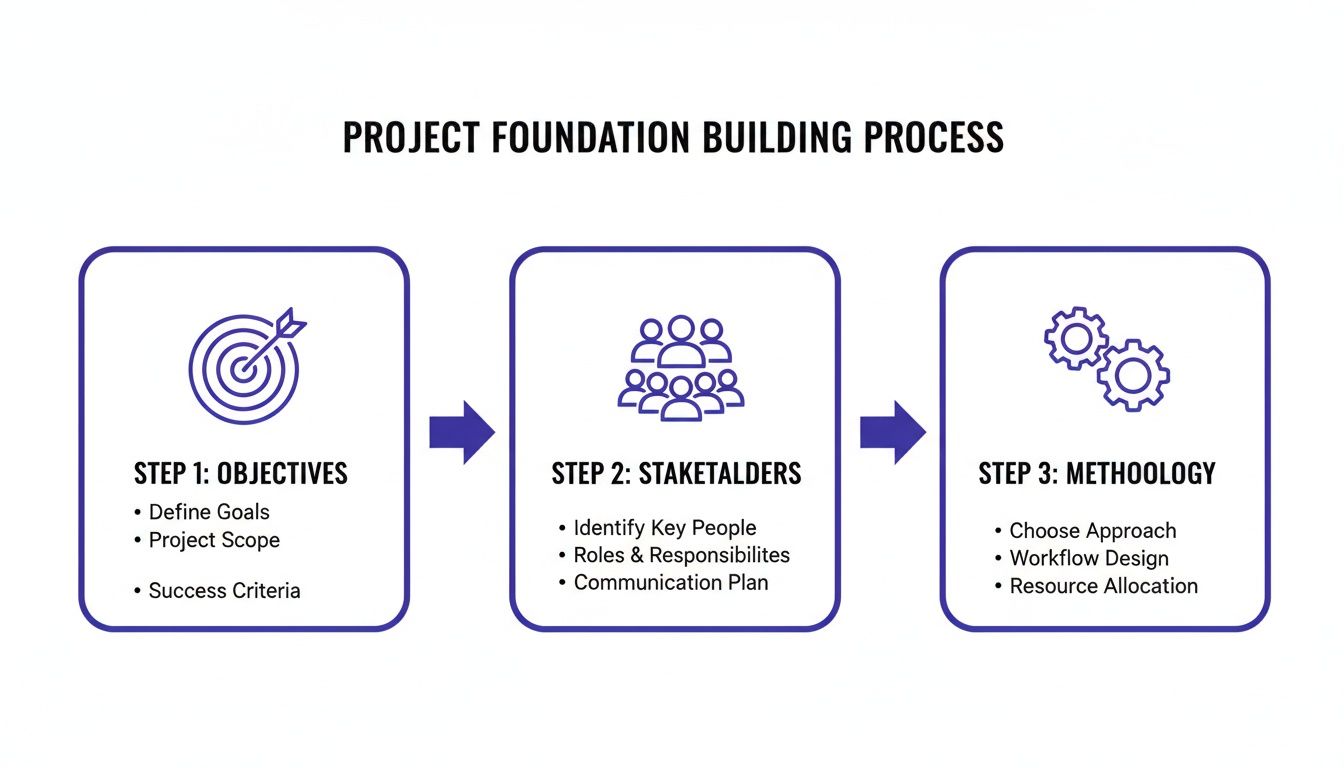
The diagram below shows how your objectives, stakeholder alignment, and chosen methodology all feed into building this project foundation. It's a good reminder that a successful launch is the direct result of deliberate planning, not just hard work during the coding phase.
Let's get into how we make this happen on the ground.
Energizing Your Team with Sprint Planning
I've seen sprint planning meetings go two ways: they're either a source of energy and clarity or a tedious chore that just drains morale. The difference is all in the approach. The goal isn't just to hand out work; it's to build a shared understanding of what the team will achieve together over the next sprint, which usually lasts 1-4 weeks.
A great session kicks off with a well-groomed backlog. Before anyone even walks into the room, the product owner or project manager should have already prioritized the user stories and features. During the meeting, the team grabs the high-priority items, asks a ton of clarifying questions, and collectively decides what they can realistically get done.
The best sprint planning meetings feel like a strategic huddle, not a top-down directive. When you empower developers to pull tasks into the sprint themselves, you see a huge jump in their ownership of the outcomes.
This collaborative estimation is so important. You're tapping into the expertise of the people who will actually do the work, leading to timelines that are way more accurate than any manager could cook up in a vacuum.
From Epics to Actionable Tasks
Breaking down the work is a core skill you have to master. The hierarchy I've always found most effective looks something like this:
Epics: These are your big-ticket features, like "Implement a New E-commerce Checkout." They're way too big to tackle in a single sprint.
User Stories: You slice epics into user stories that describe a feature from an end-user's point of view. For instance, "As a customer, I want to save my shipping address so I can check out faster next time."
Tasks: Each user story is then broken down again into specific technical tasks for developers, designers, and QA testers.
Let’s take that "save my shipping address" user story. The tasks might look like this:
Design the UI for the "Save Address" checkbox.
Develop the frontend component for the address form.
Create the backend API endpoint to store address data.
Write a database migration script for the new address table.
Develop a QA test case to verify the feature works correctly.
Getting this granular makes the work easy to assign, track, and test. It also has a superpower: uncovering hidden dependencies early on. You’ll immediately see that the frontend developer can't finish their task until the backend API is ready, which helps you sequence the work logically and avoid those frustrating bottlenecks.
Keeping the Project Humming with Daily Stand-Ups
Once the sprint is off and running, daily stand-ups become the heartbeat of the project. And let's be clear: these are not status report meetings for the manager. They are quick, 15-minute syncs for the team, by the team.
Every team member gives a quick answer to three questions:
What did I get done yesterday?
What am I working on today?
Are there any blockers in my way?
That third question is easily the most important. The stand-up is the number one place to identify and squash roadblocks before they can derail the entire sprint. If a developer is stuck waiting on an API key or a designer needs feedback on a mockup, the team can immediately jump in to solve the problem, keeping momentum high and the project moving forward smoothly.
Creating a Frictionless Feedback and Review Cycle
Nothing grinds a web dev project to a halt faster than a messy, confusing feedback process. We've all been there, right? The endless email chains, spreadsheets overflowing with conflicting notes, and those long video calls where stakeholders can't quite describe what they're seeing on their screen. This kind of chaos doesn't just create delays; it kills momentum and frustrates everyone involved.
The real problem with old-school feedback is the gap between the comment and the context. When a client says, "The button on the top right is too small," are they talking about the header? The main nav? A specific component? It turns developers into detectives, wasting precious time figuring out what to fix instead of actually fixing it. This is exactly where a direct, visual approach completely changes the game.
Moving from Vague Notes to Visual Context
Picture this: your designer just pushed a new feature to the staging site. Instead of blocking out a 45-minute screen-share meeting, stakeholders can just open the page, click directly on any element they want to talk about, and drop a comment right there. Boom. Every piece of feedback is instantly tied to a specific visual component.
This approach takes all the guesswork out of the equation. When a comment is pinned to an element, you automatically capture critical context:
The exact component in question: No more "which button are you talking about?"
An annotated screenshot: A visual record is created with every single comment, showing precisely what the reviewer saw.
Browser and OS details: All the tech specs are logged automatically, which helps your developers replicate bugs in a snap.
This kind of visual feedback loop turns ambiguous requests into crystal-clear, actionable tasks that can be fired straight into your project management board.
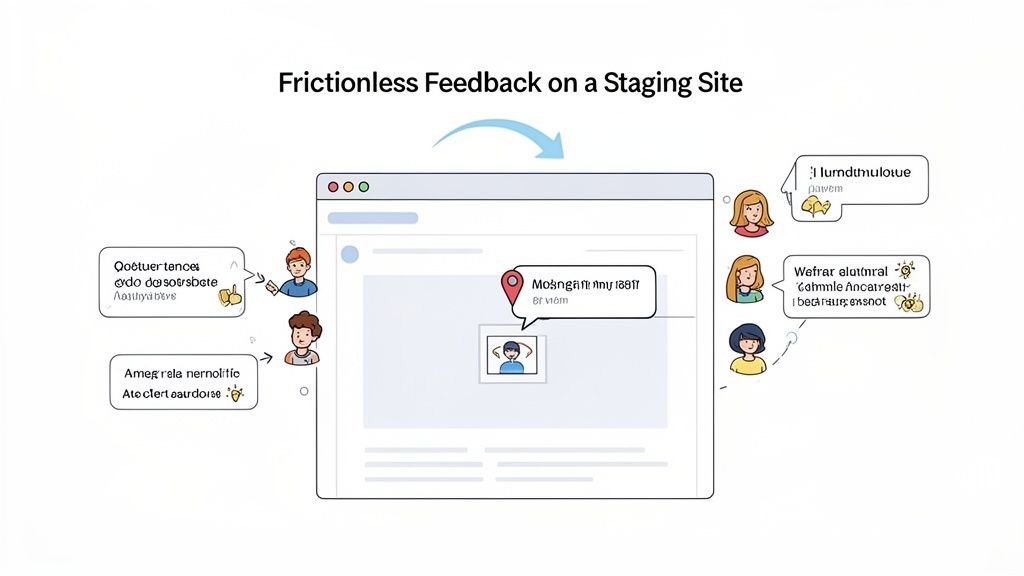
As you can see, the comment "Can we make this text bold?" is pinned directly to the headline. There is zero room for misinterpretation. That's the core of a frictionless review cycle.
Plug Feedback Directly Into Your Workflow
Just collecting feedback is only half the battle. You need a solid system to manage and act on it. One of the biggest bottlenecks I see is project managers having to manually copy-paste notes from emails or docs into a tool like Jira or Trello. This manual data entry is not only tedious but also a recipe for human error.
Modern tools like Beep solve this by connecting feedback collection directly with task management. When a stakeholder leaves a comment on a live page, it doesn't just sit in some random inbox. It gets instantly converted into a task on a built-in Kanban board.
The most effective feedback cycles are those that treat every comment as a potential task from the moment it's created. This closes the gap between review and execution, dramatically speeding up iteration cycles.
From there, the task can be assigned to a developer, given a priority, and tracked all the way to completion—all within the same system. This seamless flow is crucial for keeping up your velocity, especially in Agile environments where you're iterating quickly. For a deeper dive, you can learn how to enhance your client feedback process for better results with a few key strategies.
Centralize Communication for a Single Source of Truth
A successful feedback loop absolutely requires a single source of truth. When conversations are scattered across Slack, email, and meeting notes, it becomes impossible to keep track of what was decided. Bringing all project discussions and feedback into one place ensures everyone—from the client to the junior dev—is on the same page.
Here’s what you get with a centralized feedback hub:
A Complete History: Every comment, reply, and resolution is logged and tied to a specific task. This creates a crystal-clear audit trail.
No More "He Said, She Said": When all feedback is documented in context, there are no disputes about what was requested or approved.
Better Stakeholder Collaboration: Clients and internal team members can have threaded conversations directly on the tasks, keeping discussions focused and organized.
By ditching fragmented communication channels for a unified platform, you turn the review cycle from a project bottleneck into a powerful engine for progress. Your team ends up spending less time chasing down feedback and more time building an amazing website.
Navigating Quality Assurance and a Smooth Deployment
You’ve designed, developed, and gathered feedback—now it's time for the final stretch where quality gets locked in. This phase is less about dreaming up new features and more about hardening what you’ve already built. Getting this part right is the difference between a chaotic, bug-filled launch and a smooth, professional deployment that leaves clients thrilled.
The goal here is to shift from a "dev-complete" mindset to a "launch-ready" reality. That pivot hinges on two critical, and often misunderstood, testing stages: Quality Assurance (QA) and User Acceptance Testing (UAT). They might sound similar, but they serve completely different purposes in your workflow.
The Two Pillars of Pre-Launch Testing
First up is Internal QA. Think of this as your team’s first line of defense. It’s a methodical process where your developers and testers intentionally try to break things. They're hunting for technical flaws, functional bugs, and any inconsistencies that go against the project requirements.
Then there's UAT, which is all about the end-user. This is where you hand the keys over to the client or a small group of actual users to see if the website meets their real-world needs. They aren't looking for code errors; they're asking, "Does this actually work the way we need it to?"
Think of it this way: QA ensures the house is built to code—the plumbing works, the electricity is safe. UAT ensures the house is a home the client actually wants to live in—the kitchen layout is practical, and their furniture fits in the rooms.
Both are non-negotiable. If you skip internal QA and go straight to UAT, you’ll flood your client with preventable bugs, which erodes trust fast. On the flip side, skipping UAT means you risk launching a technically perfect website that completely misses the mark on user experience.
Building Your Core Testing Checklist
To keep your testing phase from descending into chaos, a checklist is your best friend. It provides a clear framework for both QA and UAT and makes sure nothing important gets missed.
Every web project checklist should cover these essentials:
Functionality Testing: Does every single link, button, form, and interactive element work correctly? This covers everything from simple newsletter sign-ups to complex e-commerce checkouts.
Cross-Browser and Device Compatibility: The site has to look and work flawlessly on all the big players: Chrome, Firefox, Safari, and Edge. Don't forget to check it on desktops, tablets, and a variety of mobile screen sizes.
Performance and Speed: How fast do your pages load? A site that takes more than 3 seconds to load can lose almost half of its visitors. Test your image optimization, server response times, and overall code efficiency.
Accessibility Compliance: Can users with disabilities navigate your site? Check for things like proper color contrast, keyboard navigation, and screen reader compatibility to meet WCAG standards.
A structured approach like this prevents the testing phase from becoming a random click-fest. For a much deeper dive, take a look at our guide on the ultimate QA checklist for website launches, which breaks down eight core areas in full detail.
Managing Bug Reports Without the Chaos
As your testers start finding issues, you need a solid system to capture, track, and resolve them. A messy spreadsheet or an endless email chain just won’t cut it. To empower developers to fix things quickly, every bug report needs clarity and context.
A good bug report should be a self-contained task with:
A Clear, Concise Title: "Login button broken on Safari" is infinitely better than "Bug found."
Steps to Reproduce: A numbered list of the exact actions someone needs to take to see the bug in action.
Expected vs. Actual Results: Clearly explain what should have happened versus what actually did.
A Visual Record: This is huge. An annotated screenshot or a short screen recording is worth a thousand words.
This is where visual feedback tools become a lifesaver. Instead of a tester manually typing all this out, they can just click on a broken element, add a quick comment, and the tool automatically captures a screenshot, browser details, and console logs. It transforms bug reporting from a painful chore into a seamless part of the workflow.
The Final Handoff: A Smooth Deployment
With testing done and all the critical bugs squashed, it's finally time for deployment. A smooth launch is all about preparation and communication. The deployment handoff shouldn’t be a last-minute scramble—it needs to be a planned, deliberate transition.
Your handoff documentation should give the client (or their IT team) everything they need to manage the site after you're gone. This usually includes login credentials, hosting details, technical documentation for any custom features, and a simple guide for updating content in the CMS. A well-documented handoff ensures a clean break, prevents endless follow-up questions, and truly sets your client up for success.
Alright, so you’ve launched the site. High fives all around! But don't pop the champagne just yet. The launch isn't the finish line; it’s really just the start of the next race. Real project management kicks in after deployment, when we get to see how the site performs in the wild and figure out how to make our process even smoother next time.
This is where we shift gears from just tracking project tasks to keeping a close eye on a few key performance indicators (KPIs). These numbers give you the hard, objective truth about how your new website is actually doing.
Measuring What Matters Post-Launch
You could drown in data, so it's critical to focus on a handful of KPIs that tie directly back to the original goals of the project. Forget vanity metrics. Stick to the data that helps you make smart decisions.
Here’s what I always keep on my dashboard:
Uptime and Site Speed: This is the bedrock. If the site is slow or, worse, down, nothing else matters. I use tools like Google PageSpeed Insights to hunt down performance bottlenecks that are killing the user experience and tanking SEO. A good baseline to shoot for is 99.9% uptime. Anything less needs immediate attention.
User Engagement: Are people actually sticking around? I look at metrics like bounce rate, how long they stay (average session duration), and how many pages they visit. If engagement is low, it’s a red flag that something is off with the content, navigation, or the overall user experience.
Conversion Rates: This is the big one. Whether a "conversion" for you is a submitted contact form, a product purchase, or a newsletter signup, this metric tells you if the site is actually doing its job and hitting those business goals we set way back in the planning phase.
Learning from the Past with Project Retrospectives
Performance data tells you the "what," but your team can tell you the "why." This is where project retrospectives come in, and honestly, they're one of the most valuable things you can do. It's a structured, blame-free meeting to just talk about the project—what went right, what went wrong, and what we can do better. The whole point is to build a culture of improvement, not to point fingers.
A retrospective isn't about assigning blame for what went wrong. It's about creating a shared understanding of the project's journey to make the next one even better.
I like to keep the framework super simple to get the conversation flowing. Just ask three questions:
What Went Well? Let's celebrate the wins! What processes or tools worked like a charm? We want to do more of that.
What Could Be Improved? Where did we hit roadblocks? Was it a communication gap, a technical hurdle, or a bottleneck in our workflow?
What Did We Learn? What are the big takeaways? This could be about our tools, how we work together, or our estimation process.
The key is to turn these insights into actual, concrete action items for the next project. That's how you ensure every launch makes your team stronger, faster, and way more effective.
Got Questions? I've Got Answers
Even with the best guide in hand, some questions always pop up when the rubber meets the road. I get it. Here are some quick-fire answers to the things people ask me most often.
What’s the Single Biggest Challenge in Web Development Project Management?
Hands down, it's scope creep. It’s the silent killer of timelines and budgets. You know how it goes—the project starts with a clear goal, but then "small tweaks" and "quick additions" start piling up. Before you know it, you're drowning in work that was never part of the original plan.
Your best defense is a good offense. You absolutely must have a rock-solid scope document that everyone signs off on before a single line of code gets written. Then, create a formal change request process. It ensures every new idea is properly evaluated instead of just tacked on, keeping everyone honest and the project on track.
How Can I Actually Improve Communication Between My Team and Clients?
Get out of endless email chains. Seriously. Most miscommunication happens when feedback is just a wall of text, completely disconnected from what it’s actually referring to on the website.
The fix is to bring the conversation to the visuals. Instead of trying to describe "the blue button in the top right corner," use tools that let clients and your team drop comments directly onto the live webpage or mockup. This links every single piece of feedback to the specific element it’s about. It’s instantly clear, actionable, and leaves zero room for guessing games.
So, What's the Best Project Management Tool for Web Development?
The honest answer? The "best" tool is the one your team will actually use. But from my experience, the real magic happens when you find a tool that combines task management with a killer visual feedback system.
Look for something that gives you a Kanban board to see your project's flow, but also lets you review and comment on live sites. A tool that does both means you can stop jumping between different apps. You can turn a client's comment on a webpage directly into a task for a developer, all in one place. It keeps everything connected from start to finish.
Ready to ditch those messy feedback loops and get projects shipped faster? Beep lets you and your clients leave visual, contextual comments right on live websites. It turns feedback into actionable tasks in a click. Start for free and see how it feels.
A practical and informative guide to managing web projects effectively. The focus on planning, communication, timelines, and collaboration highlights what makes a successful web development company deliver quality results while keeping projects organized and on track.
Great, practical breakdown — thanks for this guide. If your team juggles multiple web projects, another useful roundup to compare multi-project management tools is https://www.epicflow.com/blog/7-multi-project-management-software-solutions-to-test/ which highlights strengths and trade-offs across seven options. It helped me narrow choices based on resource leveling and reporting.
Great practical guide — clear steps and useful templates for managing web development projects. For teams considering custom builds, I also recommend checking out a concise piece on bespoke software that complements the project management tips here. It helped me think through scoping and vendor selection.
Project invoices get easier to control when I looked for how to contact quickbooks intuit after opening the company file, account email, invoice number, subscription record, and payment note. That is the kind of support path I use for billing questions, payroll access, tax-form settings, login problems, payment syncing, or client invoice records. In web-development work, I keep project budgets, contractor payments, receipt uploads, and software subscriptions organized because one missing accounting detail can slow the whole job. I also write down the exact screen or error message ahead of support so the request starts with one account, one file, and one financial record. That keeps the software question practical instead of turning it into a general business problem.