
.png)
Collaboration Software Comparison The Definitive Guide for Teams

Picking the right collaboration software can feel like a total shot in the dark, but it really boils down to one simple thing: find a tool that fits how your team already works, not one that makes you twist your workflow into a pretzel. This guide cuts through the noise of generic feature lists. We're going to dive into a real collaboration software comparison that actually cares about how modern teams operate.
How to Choose the Right Collaboration Software

With remote and hybrid work now the norm, these tools have gone from nice-to-haves to the absolute backbone of a business. It's no surprise the global market hit $18.2 billion in 2024. Just look at the jump in usage—from 55% in 2019 to 79% only two years later. It’s clear these platforms are essential.
I'm here to give you a detailed, context-aware comparison that focuses on what truly matters: visual feedback, workflow automation, and deep integrations that just work. The goal is to help you make a choice you feel good about.
Key Evaluation Criteria
Before you even look at a single platform, you have to know what you need. A tool that’s a dream for the marketing team could be a nightmare for your developers.
Think about these three pillars first:
Workflow Integration: Does the software feel like a natural extension of your current process, or is it asking you to start from scratch? The best tools slot right in.
Role-Specific Functionality: A product manager lives and breathes by feedback collection, while a designer needs pixel-perfect annotation tools. Pinpoint the must-have features for each person on your team.
Measurable Productivity Gains: The whole point is to make life easier. You want software that kills pointless meetings, makes communication crystal clear, and puts repetitive tasks on autopilot.
Trying to navigate this crowded market without a plan is a recipe for disaster. If you want to get into the mindset of making solid choices for business-critical tools, check out this data-driven guide to defensible vendor choices for enterprise software. It really helps you filter out the hype and focus on what delivers real value.
The best collaboration software doesn't just add features; it removes obstacles. The right tool simplifies how you talk to each other, automates the boring stuff, and gives your team more time to actually do their best work.
To kick things off, here's a quick look at where the most popular tools tend to focus. Think of this as the warm-up before we get into the deep-dive analysis.
Feature Focus | Ideal For | Common Platform Examples |
|---|---|---|
Task & Project Management | Teams needing structured timelines and assignments. | |
Visual & In-Context Feedback | Design, development, and product review cycles. | |
Real-Time Communication | Instant messaging and quick team alignment. | |
Document Collaboration | Co-editing documents, spreadsheets, and presentations. |
Core Features That Drive Team Performance
If we're going to compare collaboration software, we first need to agree on what "high performance" actually means for a team. It's not about cramming the most features into one platform. It’s about having the right features—the ones that get rid of friction and keep everyone on the same page.
The best tools are built around a handful of core capabilities that solve the real, everyday headaches that product, design, and development teams face. These aren't just nice-to-haves; they're the non-negotiables that separate a clunky tool from one that actually helps you ship projects faster.
Eliminating Ambiguity with Visual Feedback
We've all been there. Long email chains, messy spreadsheets, and vague feedback that just creates more questions. A designer gets a comment like, "the button doesn't look right," and is left scratching their head, trying to guess what the stakeholder actually meant. That back-and-forth guessing game can burn hours, even days, and slows everything down.
This is where in-context visual feedback tools come in. They let team members click directly on a webpage or a design file to drop a comment. Simple, right? But it creates an undeniable link between the feedback and the exact element being discussed. There’s just no room for misinterpretation when the comment is literally pinned to the component in question.
For any team focused on visual precision, this is a must. A product manager can drop a pin on a new UI element and write, "Let's change this CTA copy to 'Get Started Free'." The developer knows exactly what to change without needing a follow-up call or clarification.
A study on team productivity found that clear, contextual communication can slash project completion times by as much as 30%. Visual feedback is the bedrock of that clarity, turning fuzzy suggestions into sharp, actionable instructions.
Capturing Precision with Automated Screenshots
Context is king, especially in bug reporting and QA. A developer can't fix an issue they can't reproduce, and a text description alone rarely tells the whole story. Automated screen capture is a simple but incredibly powerful feature that solves this common bottleneck.
When a user leaves a comment, the software should automatically snap a screenshot of the page. Even better, it should grab all the important metadata—browser version, OS, screen resolution—without anyone lifting a finger. This gives developers all the technical details they need to diagnose the problem and get to a fix, fast.
Picture a QA tester who finds a weird rendering issue that only shows up on a specific browser and screen size. Instead of manually taking screenshots and typing out all the tech specs, they just click and comment. The tool does the rest, turning a 15-minute reporting chore into a 15-second task.
Maintaining Momentum with Smart Integrations
Let's be real: a collaboration tool that doesn't connect to your other software is just another silo. To be truly useful, it needs to plug right into the ecosystem your team already lives in every day. Solid integrations stop the constant context-switching and let information flow where it needs to go.
For modern teams, a couple of integrations are absolutely critical:
Project Management Tools: Think Jira or Asana. When feedback comes in, you should be able to turn it into a task in your project management system with one click. This closes the loop between spotting an issue and getting it into the workflow, making sure nothing gets lost.
Communication Hubs: We're talking Slack or Microsoft Teams. Real-time notifications are key to keeping things moving. When a designer tags a developer with a question, a quick ping in Slack means they'll see it right away. If you want to dig deeper into this, our guide on the top communication tools for teams is a great place to start.
Turning Feedback into Action with Workflow Tracking
Collecting feedback is just the start. The real magic happens when you can manage it effectively. A great collaboration platform needs to have some kind of intuitive task management, like a kanban board, to give everyone a clear view of what’s going on.
When a piece of feedback is submitted, it should pop up as a new card in a "To Do" column. As a developer grabs it, they slide it over to "In Progress," and then to "Done" when it's complete. This visual system gives the entire team an at-a-glance status update on every single task, killing the need for those "just checking in" meetings.
This transparency empowers everyone. You can see what’s being worked on, what’s coming up next, and where potential roadblocks are forming. It builds a culture of accountability and shared ownership, which is what great teamwork is all about.
To wrap up, the features we've just walked through aren't just bells and whistles; they're the foundation of a high-functioning team's toolkit. Below is a quick checklist summarizing why each of these elements is a must-have for any team serious about collaboration.
Essential Collaboration Feature Checklist for Modern Teams
Feature | Description | Why It's Critical |
|---|---|---|
Visual Feedback | Allows users to click on any element of a design or webpage to leave a specific, in-context comment. | Eliminates ambiguity and reduces back-and-forth communication, ensuring feedback is precise and immediately understandable. |
Automated Screenshots | Automatically captures a screenshot of the user's screen, including technical metadata like browser, OS, and resolution. | Gives developers the exact context they need to reproduce and fix bugs quickly, turning a lengthy reporting process into a few clicks. |
Smart Integrations | Connects seamlessly with project management (Jira, Asana) and communication tools (Slack, Teams). | Creates a unified workflow, prevents context switching, and ensures feedback is immediately converted into actionable tasks. |
Workflow Tracking | Provides a visual system, like a kanban board, to manage the status of feedback from "To Do" to "Done." | Offers team-wide transparency on task progress, fosters accountability, and eliminates the need for constant status update meetings. |
Having these core features in place means your team spends less time clarifying and more time creating. It’s the difference between a tool that just documents problems and one that actively helps you solve them.
Comparing the Leading Collaboration Platforms
Alright, let's cut through the noise. Choosing the right platform in a market this crowded means you have to go deeper than just looking at feature lists. We need to really understand how tools like Jira, Asana, Trello, and Beep actually work for teams building things on the web. The goal here isn't to pick one "best" tool, but to figure out which one fits your team's workflow.
What works for a massive engineering department will just create headaches for a nimble marketing team. A platform that’s a dream for developers might be a total nightmare for designers. It's all about context. By looking at how these tools handle real-world situations, we can see where each one truly shines.
The demand for these tools is exploding, largely thanks to the big shift to remote and hybrid work. In fact, the team collaboration software market is expected to grow by a whopping $10.33 billion between 2024 and 2029. This isn't just hype; teams using these platforms are seeing a 30% drop in project downtime and an 18% jump in completion rates. That's a serious business case right there.
Jira: Where Engineering Precision Meets Complexity
Anyone who's worked with a development team knows Jira. It's the undisputed king of the engineering world, built from the ground up for complex projects. If you need intense issue tracking, sprint planning for Scrum or Kanban, and super-detailed roadmaps, Jira is your beast. Its biggest strength is how deeply you can customize every single piece of your workflow.
But all that power comes at a price: a monster learning curve. For anyone outside of a technical role, Jira's interface feels like a battleship control panel—overwhelming and incredibly rigid. Imagine a marketing manager trying to review a new landing page or a designer asking for feedback on a mockup. Jira’s text-heavy, form-based system is just plain clunky for that kind of creative, visual work.
Key Differentiator: Jira is all about its structured, ticket-based system. It’s brilliant at breaking down massive software projects into manageable chunks for developers, but that same structure makes it a poor fit for fluid visual collaboration and quick feedback rounds.
Asana: The All-Purpose Project Manager
Asana plays in a different league. It positions itself as the go-to work management hub for just about any team, from HR to marketing to sales. It’s fantastic for organizing big projects with a ton of moving parts and dependencies, offering different ways to see your work, like lists, timelines, and calendars. It’s a solid choice when you need to coordinate efforts across different departments and get that 30,000-foot view of what’s happening.
But for web project teams, Asana has a weak spot right at the start of the process: gathering feedback. Sure, you can attach files and drop comments on tasks, but it's missing that direct, on-the-page annotation capability. This means a designer still has to go through the old, clunky routine: take a screenshot, mark it up, upload it, and then write a long comment trying to explain what they mean. It’s the very ambiguity that modern visual feedback tools were built to solve.
The infographic below really drives home how important core features are for modern teams.
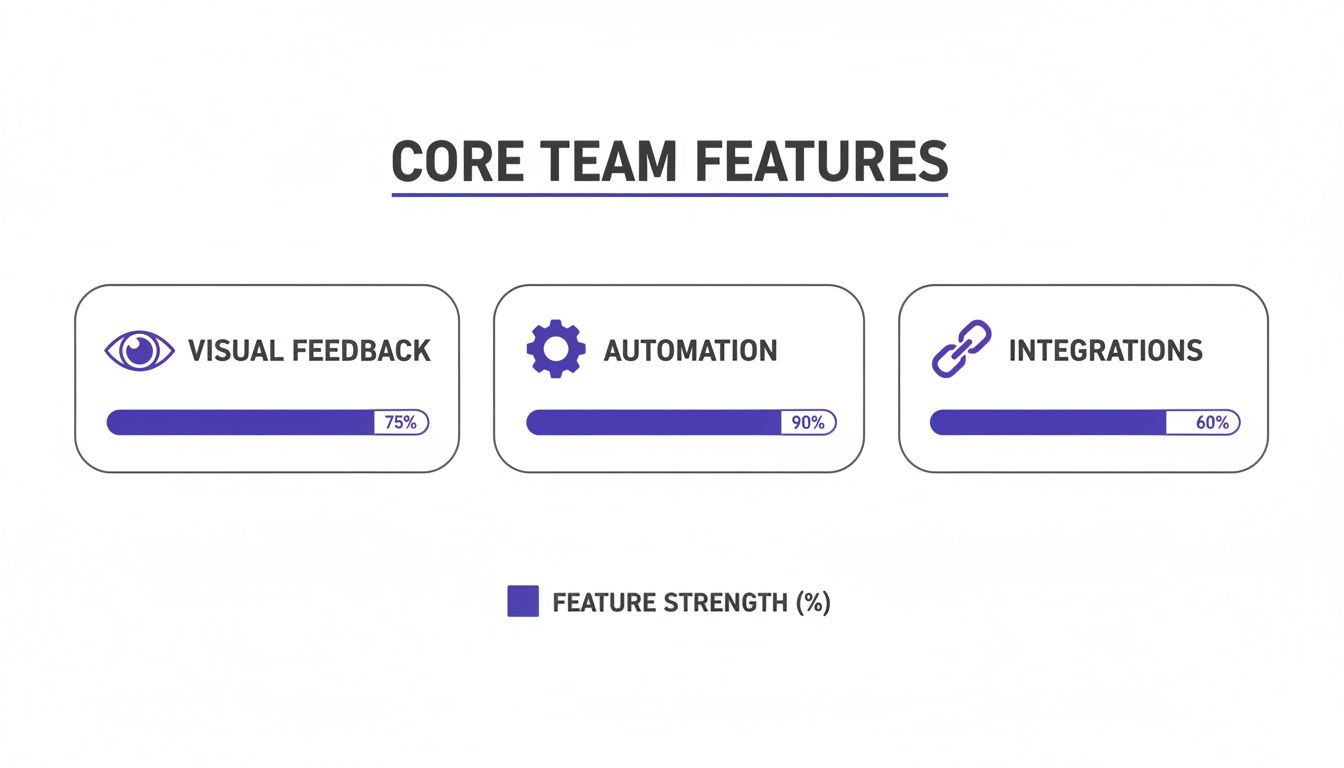
This data shows just how critical automation and visual feedback have become for keeping teams efficient and on the same page.
Trello: The Master of Simplicity
The beauty of Trello is its almost ridiculous simplicity. Its Kanban board is so intuitive that pretty much anyone can get the hang of it in five minutes. For simple task management, personal to-do lists, or basic content calendars, Trello is an absolute joy to use. There’s something so satisfying about dragging a card from "To Do" to "Done."
But that same simplicity is also its biggest weakness. For anything more complex, Trello just doesn't have the muscle. It’s missing the powerful reporting, detailed sub-tasking, and workflow automations you find in the bigger tools. And when it comes to turning feedback into a task, Trello makes you do all the heavy lifting. You’re stuck collecting feedback from emails or Slack, then manually creating a Trello card for every single item.
Beep: Bridging the Gap Between Feedback and Action
This is where Beep comes in, with a laser focus on fixing one of the biggest headaches for web teams: the gap between seeing a problem and actually doing something about it. Beep lets you comment directly on any live website or web app. You see something, you click, you comment. Done.
When you leave that comment, Beep automatically grabs a screenshot and all the important technical details—like the browser, OS, and screen size. This creates a perfect, crystal-clear record of the issue. That in-context feedback then instantly becomes a task card in an onboard Kanban system. A comment isn’t just a comment; it’s an actionable task you can assign, prioritize, and track all the way to completion. It closes the loop that other platforms leave wide open.
If you want to dig into more options, you might find this list of Top Remote Team Collaboration Tools useful. And for a deeper dive, check out our own list of the top 11 remote collaboration tools to boost team productivity.
A Situational Comparison of Key Features
Let's get practical. Here’s a quick breakdown of how these platforms handle common tasks for web project teams.
Scenario | Beep's Approach | Jira's Approach | Asana's Approach | Trello's Approach |
|---|---|---|---|---|
Giving Design Feedback | Click right on the design element on a live site to leave a comment. Screenshot and metadata are captured automatically. | Create a new ticket, write a long description of the change, and manually attach a marked-up screenshot. | Create a task, attach the screenshot, and leave comments in the task description or a long comment thread. | Create a card, attach the screenshot, and use the description or comments to explain the feedback. |
Reporting a Bug | Point and click on the bug on the live page. The browser, OS, and screen size are automatically logged with your comment. | Fill out a detailed bug report form, manually entering all the technical specs and steps to reproduce the issue. | Create a bug task, describe the issue, and manually add all the technical details and attachments yourself. | Make a "Bug" card and write out the details, hoping the developer has enough info to figure it out. |
Tracking Progress | Feedback instantly appears as a card on a built-in Kanban board. Just drag it through stages like "To Do" and "Done." | The bug ticket moves through a complex, highly customized workflow that the engineering team built. | The task gets moved across different sections or projects, with progress tracked by status updates and completion checkmarks. | The card is manually dragged from one list to another, giving a simple visual of where things stand. |
Looking at it this way, you can see a clear difference in philosophy. Jira and Asana are powerful project management machines that need you to feed them information in a very specific way. Trello gives you a blank canvas for basic tracking. Beep, on the other hand, starts with the feedback itself and builds the workflow from there, creating a much tighter, more efficient process for any team working on the web.
Matching Software to Your Team's Workflow
Let's be real: a one-size-fits-all approach to collaboration software is just a recipe for wasted money and seriously frustrated teams. The best tool isn't the one with the longest feature list. It's the one that actually fits the day-to-day grind of your team's workflow. What a product manager needs is worlds away from what a developer requires to be effective.
Thinking this way is the key to a smart software comparison. If we break down what different roles actually do, we can see which tools get rid of friction and which just add another layer of complexity. So, let’s dig into the ideal software setups for four key players in any web project.
For Product Managers Mastering Feedback and Roadmaps
Product managers are the ultimate jugglers, constantly balancing user needs, business goals, and development realities. Their biggest headache? Collecting, sorting, and prioritizing the never-ending stream of feedback from users, stakeholders, and their own teams. They need a tool that can turn vague ideas into solid feature requirements.
Your standard project management tool usually falls flat here. It forces PMs to manually copy-paste feedback from emails, Slack threads, and meeting notes into tickets. This is exactly where a platform like Beep becomes a PM’s best friend. It lets stakeholders drop feedback right onto a live website, which automatically spins up a task.
This single feature completely changes the game for a PM. Instead of trying to translate a cryptic email into a Jira ticket, they get a perfectly documented piece of feedback, complete with a screenshot and all the technical data already attached. This lets them focus on the important stuff—like prioritizing work on a visual Kanban board—instead of getting bogged down in administrative data entry.
For UX/UI Designers Needing Visual Precision
For designers, clarity is everything. Vague feedback like "make it pop more" is the stuff of nightmares. Their perfect tool has to enable pixel-perfect communication, letting them make precise annotations directly on their designs and prototypes.
Sure, tools like Figma and Sketch have commenting features, but the conversation often stays locked inside the design file. The real challenge is closing the gap between the design review and the actual development work. A designer has to be sure their feedback gets seen and understood by the developers who are supposed to build it.
This is where tools that focus on visual, in-context feedback are absolute gold. Any platform that lets a stakeholder drop a pin on a specific UI element and leave a comment cuts out the endless back-and-forth. It guarantees that when a designer points out a specific hex code or a pixel adjustment, the developer sees that comment tied to the exact component they're working on.
A visual-first feedback tool acts as a translator between creative vision and technical execution. It removes the guesswork, ensuring that what the designer intended is exactly what gets built, reducing revision cycles and speeding up the entire design-to-development handoff.
This direct line of communication is crucial for keeping the design's integrity intact from start to finish.
For Developers Prioritizing Efficient Bug Tracking
To fix a bug, a developer needs one thing above all else: context. A bug report that just says "the login button is broken" is basically useless. They need to know the user's browser, their OS, screen resolution, and the exact steps to reproduce the problem. Without that info, they burn valuable time just trying to replicate the issue instead of actually solving it.
This is why old-school, text-based ticketing systems like Jira can be a drag for bug reporting if you don't have super strict protocols. They depend on the person reporting the bug to manually type out all the necessary technical details—a tedious process that’s just asking for mistakes.
A specialized tool like Beep automates this whole mess. When a tester or user reports a bug by clicking on the broken element, the tool instantly captures a screenshot along with all the critical metadata:
Browser and version (e.g., Chrome 125.0)
Operating system (e.g., macOS Sonoma)
Screen resolution (e.g., 1920x1080)
The developer immediately gets a complete, actionable bug report. When you integrate this with their existing workflow, like pushing the report straight into a Jira sprint, you create a seamless bug-squashing pipeline that saves hours of detective work.
For Marketing Teams Streamlining Content Reviews
Marketing teams are content machines, constantly churning out landing pages, blog posts, ad copy, and email campaigns. Their workflow is a whirlwind of stakeholders—copywriters, designers, brand managers, legal experts—who all need to weigh in. Trying to manage this review process over email or in Google Docs quickly spirals into chaos, with conflicting edits and version-control nightmares.
Marketers need a single, central place where everyone can review live web pages and campaign assets. Their ideal tool lets them give quick, clear feedback on copy, images, and layout without needing to be a tech wizard.
Using a tool that allows direct on-page commenting, a campaign manager can share a preview link to a new landing page. The copywriter can suggest a better headline, the designer can ask for an image swap, and the legal team can flag a compliance issue—all in one place, with every comment pinned to the element it’s about. This kind of organized feedback loop is what gets campaigns launched on time and on message.
Your Guide to a Smooth Tool Migration
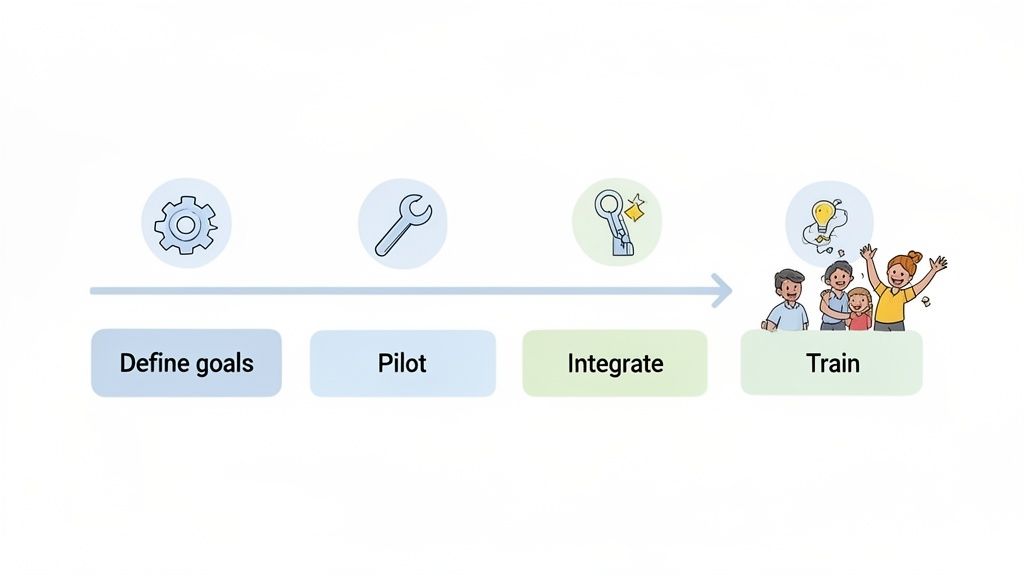
Picking the right platform is a big deal, but the real work starts when you try to implement it. I've seen it happen too many times: a clumsy rollout kills a great tool before it ever gets a chance to shine, leaving you with frustrated teams and a wasted budget. To sidestep that disaster, you need a solid plan for evaluation and migration that’s all about adoption, not disruption.
The whole thing starts with knowing what "success" actually looks like for your team. Before you even touch a free trial, get everyone to agree on the key metrics you want to move the needle on. Vague goals like "better collaboration" just won't cut it.
You need to get specific and define measurable outcomes.
Quantitative Goals: Think big but be precise. Aim to slash bug reporting time by 50%, drop the number of weekly review meetings by 25%, or kill a chunk of those back-and-forth project clarification emails.
Qualitative Goals: You could also focus on smoothing out the designer-developer handoff process or just making stakeholders feel more confident about project timelines.
Once you have these goals, you've got a benchmark. Your evaluation instantly shifts from a simple feature tour to a data-driven decision.
Running an Effective Pilot Program
Whatever you do, don't roll out a new tool to the entire company at once. That's a recipe for chaos. The best way to do this is to start small with a dedicated pilot program.
Pull together a small, cross-functional crew—maybe one product manager, a designer, and a couple of developers—who are genuinely open to change and will give you their honest take.
This pilot group should use the new software on a real, low-stakes project for a set time, like two or four weeks. Their mission? To stress-test the tool against your goals and document every single friction point. This kind of focused trial gives you priceless insights into how the tool actually works in your workflow, not just in a polished demo.
The most common reason new software fails is a lack of buy-in from key people. A good pilot program turns your test group into internal champions. They can vouch for the new tool from firsthand experience, which makes getting the whole company on board so much easier.
Auditing Integrations and Training Your Team
A new tool has to play nicely with your existing tech stack, period. A critical step before going all-in is to audit its integrations with your mission-critical software. Does it connect smoothly with your project management system? How well does it sync with your team's chat app?
For a great example of what a seamless connection looks like, check out our practical guide to Beep integration with Jira.
Once you've confirmed the integrations are solid, it's all about training. Please don't just send a link to a knowledge base and call it a day. Host live training sessions that are tailored to different roles, showing each group how the software solves their specific problems.
Make sure to record these sessions. That way, new hires can get up to speed fast. By following a structured plan like this, you ensure your new collaboration software becomes a genuine asset that empowers your team from day one.
Frequently Asked Questions About Collaboration Software
Thinking about switching up your team's software? Good. But let's be real, navigating the sea of collaboration tools brings up a lot of the same old questions. Getting clear on common hurdles like workflow disruption, justifying the cost, and getting everyone on board is key to making the right call.
I've been there. Let's tackle these questions head-on so you can choose a tool that not only fixes today's problems but grows with you tomorrow.
What's the Biggest Mistake Teams Make When Choosing Collaboration Software?
Honestly? They get dazzled by a massive feature list and completely forget about how their team actually works. A tool with a hundred bells and whistles is useless if it blows up your existing workflow. The whole point is to find software that slides right into your current process, not force everyone to learn a new, complicated system from scratch.
Think about it. If your design and dev teams live and breathe by visual reviews for web projects, picking some text-heavy, clunky tool would be a disaster. You've got to prioritize a visual-first platform that fits your review cycle like a glove. That's how you avoid friction and get people to actually use the thing.
The best tool isn't the one with the most features; it's the one that requires the least amount of change from your team to get started. Seamless integration will always beat a feature-rich platform that nobody uses.
How Can I Justify the Cost of a New Collaboration Tool?
Stop talking about the monthly price tag and start talking about the return on investment (ROI). You have to frame the cost in terms of real, hard numbers that the finance department can't ignore. It’s all about building a solid business case.
Start by calculating the time your team is currently wasting on bottlenecks:
How many hours do you burn in pointless review meetings?
How much time is lost trying to figure out vague feedback in emails or Slack messages?
How many minutes does it take to manually create bug reports and tickets?
Put it all together into a clear, compelling argument. Something like: "This tool will cut our project iteration cycles by 30%, slash unnecessary meetings by 5 hours per week, and help us ship products faster." When you tie the cost to getting to revenue quicker and cutting down on wasted time, it's a much easier conversation to have.
Can a Single Collaboration Tool Fit Every Department?
Almost never. A sales team's daily grind looks completely different from a developer's. Trying to shoehorn everyone into one do-it-all platform is a recipe for disaster. You'll just end up with a tool that everyone kind of hates and nobody finds particularly useful.
A much smarter play is to find a "center of gravity" tool—something that anchors collaboration on key projects where different teams overlap. For anything web-related, this would be a platform where designers, developers, marketers, and product managers can all come together to review and sign off on work.
This central hub should then plug into the specialized software each department already uses and loves, like Jira for developers or a CRM for sales. This creates a connected ecosystem where everyone can use the best tool for their job while still giving everyone visibility across the entire project. It's about flexibility, not a one-size-fits-all box.
Ready to bridge the gap between feedback and action? Beep provides the in-context visual feedback and integrated workflow tracking your team needs to deliver better web projects faster. Get started for free in under a minute.
thoitiethomnay.org tối qua mình mở vội trước khi đi ngủ để xem mai có cần mang áo mưa không. Lúc đầu hơi nghi nghi kiểu trang thời tiết hay nhồi chữ, nhưng vào cái là thấy ngay nhiệt độ hiện tại với phần “cảm giác như” hiển thị rõ ràng, nhìn phát hiểu luôn chứ không phải lục lọi; mình thích cái chỗ chọn tỉnh thành đặt dễ thấy, bấm vào là chuyển sang trang địa phương nhanh, nên đang cần xem Hà Nội hay mấy tỉnh khác cũng không mất công. Số liệu nó cập nhật trong ngày nên mình check lại vài lần vẫn thấy thay đổi hợp lý, cảm giác “tươi” hơn mấy trang để số cũ…
keo nha cai mình thấy bạn bè nhắc hoài nên bữa rảnh bấm vào coi thử cho biết. Mình không đọc kỹ nội dung đâu, chỉ kiểu lướt xem trang họ làm có dễ nhìn không thôi. Ấn tượng đầu là nền nhìn thoáng, chữ không bị dồn dập nên mắt đỡ mệt. Mấy phần thông tin họ chia thành từng khối rõ ràng, nhìn qua là biết cái nào thuộc nhóm nào, không phải kéo qua kéo lại để đoán. Thanh menu cũng nằm chỗ dễ thấy, bấm đổi mục cái là nhảy luôn, cảm giác khá mượt. Nói chung mình chỉ xem vài phút mà vẫn nhớ được cách họ sắp xếp vì các khối nội dung xếp…
Finding the right collaboration software for a team can be surprisingly difficult with so many options on the market promising similar features at different price points and levels of complexity. I also checked https://icloud.pissedconsumer.com/review.html because I was running into storage issues and wanted to see if other users had found solutions that actually worked for them without causing more problems than they solved in the long run.
I liked how the article broke down the differences between tools like Slack and Microsoft Teams, especially when it mentioned how integrations can really shape a team’s workflow. It made me think about how different types of teams like those handling technical projects or even something like Finance Assignment Help Australia might prioritize features differently. The comparison felt practical rather than overwhelming, which I appreciated. I do wonder though, as tools keep evolving so fast, how often teams should reassess what they’re using to stay efficient without constantly switching platforms.