
.png)
How to Build a User Acceptance Test Form That Delivers Results

A User Acceptance Test (UAT) form is the official document that guides your end-users through testing, making sure the software actually does what the business needs it to do before it goes live. Think of it as the final, critical checkpoint for tracking results, flagging bugs, and getting that all-important sign-off from stakeholders. It's how you know your product is truly ready for the world.
Why Your UAT Form Is More Than Just a Checklist
So many teams treat the UAT form like a bureaucratic chore—just another box to tick before pushing to production. That’s a huge mistake. A well-crafted user acceptance test form isn't just paperwork; it’s the bridge between what your developers built and what your business actually needs. It’s your last, best defense against angry users and expensive post-launch fixes.
This document turns abstract business goals into real, testable scenarios. It forces everyone, from the dev team to the executive sponsors, to agree on what "done" really means. It’s how you move from subjective opinions to hard, objective data that gives you the confidence to hit the launch button.
The Real-World Impact of a Structured Form
Picture this: you’re about to launch a slick new e-commerce checkout flow. Without a solid UAT form, you get feedback like, "the payment button is broken," dropped into a random Slack channel. This sends developers on a wild goose chase. Which button? On what browser? What payment method failed? The result is chaos, wasted hours, and a launch date that keeps slipping.
Now, let's replay that with a proper UAT form. A tester is guided by a specific test case. They document the exact steps they took, what they expected to happen ("payment confirmation page appears"), and the actual result ("got a 404 error"). That’s clear, actionable feedback. The developer can replicate the bug in minutes and fix it. Problem solved.
A great UAT form isn't just paperwork; it’s a communication tool that enforces clarity, accountability, and confidence. It ensures the final product delivers genuine business value, not just functional code.
Good UAT practices have been shown to cut down production failure rates by up to 40% in some industries. It’s all about standardizing test cases, tracking results, and getting formal sign-offs—all things a great form facilitates.
Beyond Bug Hunting to Strategic Validation
It's easy to fall into the trap of thinking UAT is just another round of bug hunting. While it definitely uncovers defects, its main job is validation. The form is there to focus testers on confirming that the software actually supports their day-to-day workflows and solves the problems it was designed to fix.
To get the most out of your UAT, you have to think bigger. Understanding how things like usability testing drives product growth helps you see UAT not as a final chore, but as a strategic activity that directly fuels product success and gets users on board from day one.
The Anatomy of a High-Impact UAT Form
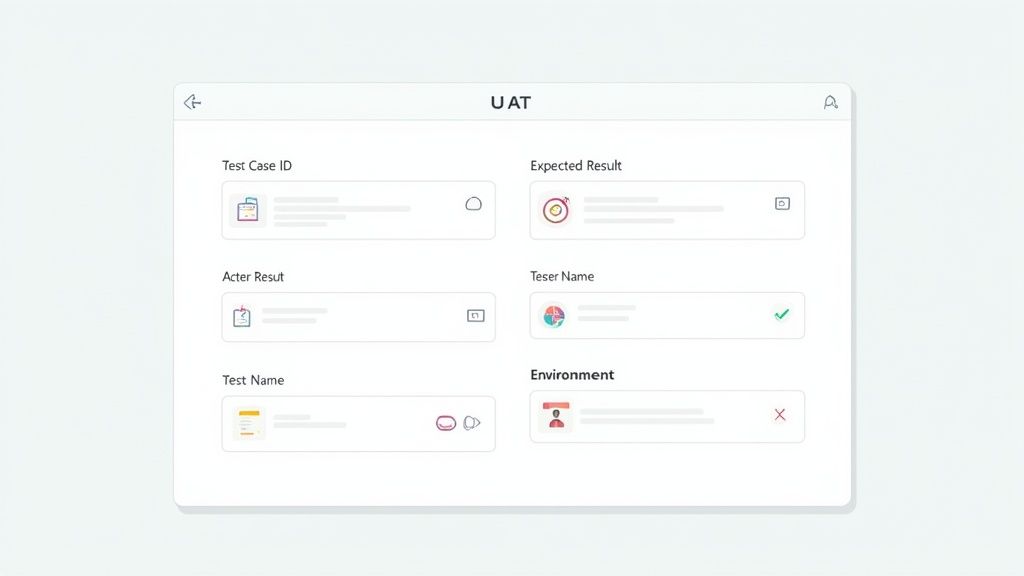
A great user acceptance test form does way more than just log feedback. It's a strategic tool that guides testers to give you clear, actionable insights. Every single field should have a purpose, designed to kill ambiguity and get that feedback loop moving faster. Let's break down what turns a simple checklist into something that actually validates your product.
Think of it this way: each part of the form tells a piece of a story. When that story is complete, a developer can spend their time fixing the problem, not trying to figure out what the problem even is.
Foundational Test Case Information
Before a tester even touches the software, the form needs to set the stage. These first few fields are the foundation, making sure every test can be traced, organized, and tied back to a specific business need. Without this, you just end up with a messy pile of feedback that’s impossible to sort through.
This section gives everyone a shared point of reference.
Test Case ID: This is a unique code (like TC-LOGIN-001) for every test. It’s not just for tracking; it’s the golden thread connecting the test, the business requirement, and any bugs that pop up. A simple ID can save you hours of headache when you're trying to cross-reference issues in your project management tool.
Test Scenario: This is a quick, plain-English summary of the goal. Instead of something technical, it describes a user's journey. For example: "User tries to log in with correct details to see their dashboard." This keeps the focus squarely on the business outcome.
Test Steps/Instructions: Here’s where you get specific. Vague instructions like "test the login" are basically useless. Be explicit: "1. Go to the login page. 2. Type in your assigned username. 3. Type in your password. 4. Click the 'Submit' button."
These fields are the bedrock of any solid UAT process. If you want a head start, checking out a complete user acceptance test template can give you a solid structure to build on.
Documenting the Outcome
Okay, this is where the magic happens. The next set of fields captures the all-important comparison between what you wanted to happen and what the user actually saw. This is the heart of validation, turning a subjective experience into hard data.
Honestly, the gap between expected and actual results is the most critical part of any user acceptance test form.
The goal isn't just to find out if something broke. It’s to confirm that the software did precisely what you promised it would. Nailing this part eliminates all the guesswork.
Expected Results: This defines success before the test even starts. It's a non-negotiable statement of what should happen. For example: "User is logged in and redirected to the dashboard within 3 seconds." There’s no room for interpretation there.
Actual Results: Here's where the tester describes, objectively, what really happened. It might match the expected result perfectly, or it could be something totally different, like: "Got an 'Invalid Credentials' error message, even though I used the right login."
Pass/Fail Status: Just a simple, binary choice. Did the actual result match the expected one? This gives you a quick, at-a-glance summary of the test's outcome, making it super easy to triage issues and decide what to fix first.
Essential Metadata for Debugging
Finally, any high-impact UAT form needs to collect metadata. These details might seem small, but they are pure gold for developers trying to track down and squash a bug. Without this info, a bug report can quickly become a dead end.
This data gives developers the "where" and "how" they need to diagnose problems quickly.
Metadata Field | Why It's Crucial | Example |
|---|---|---|
Tester Name | Identifies who ran the test so you can ask follow-up questions. | Jane Doe |
Test Date | Timestamps the test, helping you match it to a specific software build. | 2024-10-26 |
Environment/OS | Pinpoints the operating system, since some bugs are OS-specific. | Windows 11 |
Browser/Version | Specifies the browser and version, which is critical for web UI issues. | Chrome 125.0 |
Grabbing this information upfront cuts out all that frustrating back-and-forth between testers and developers. It's a small step that makes the whole resolution process dramatically faster. When you combine clear instructions, precise outcome documentation, and detailed metadata, your user acceptance test form becomes one of your most valuable assets for a smooth launch.
Writing Acceptance Criteria That Prevents Misunderstandings
Vague requirements are the silent killers of software projects. This is where even the most perfectly designed user acceptance test form can completely fall flat. When the definition of "success" is fuzzy, your testers and developers might as well be speaking different languages. That leads to endless rework, blown deadlines, and a whole lot of frustration.
Writing solid acceptance criteria is how you build a bridge over that communication gap for good.
Think of each criterion as a mini-contract for a single feature. It's a clear, testable statement that proves a piece of software does what it’s supposed to from the user’s point of view. It’s the difference between a vague goal like "the user can log in" and a concrete, verifiable outcome that leaves nothing to chance.
Adopting the Given/When/Then Framework
One of the best ways I've found to kill ambiguity is by using the Given/When/Then formula, which is a cornerstone of Behavior-Driven Development (BDD). This simple structure forces you to think through the user's situation, their action, and the expected result, leaving zero room for misinterpretation.
Here’s the breakdown:
Given: This sets the stage. What’s the state of the system before the user does anything?
When: This is the specific action the user takes.
Then: This describes the observable, measurable outcome. What should happen?
This format transforms a wishy-washy requirement into a razor-sharp test case. It's an incredibly practical way to make sure everyone—from the product manager to the QA tester—is on the exact same page. If you want to go deeper on this, we've got a whole guide on how to write test cases that actually work.
From Vague Goals to Testable Criteria
Let's see how this works in the real world. Imagine you're building a password reset feature. A weak test case might just say, "Verify password reset functionality." Honestly, that’s useless. It doesn't define what "works" actually means.
Now, let’s apply the Given/When/Then structure to create some bulletproof acceptance criteria for your UAT form.
Weak Goal: User can reset their password.
Strong Acceptance Criteria:
Given I am on the password reset page and have entered my registered email,
When I click the "Send Reset Link" button,
Then I should see a confirmation message stating, "A password reset link has been sent to your email."
See the difference? It's specific, testable, and completely unambiguous. A developer knows precisely what to build, and a tester knows exactly what to check for. To really nail this, it helps to get good at formulating effective user testing questions so your criteria always reflect what the user actually needs to accomplish.
The goal of acceptance criteria isn't just to make a list of requirements; it's to forge a shared understanding across your entire team. When the criteria are crystal clear, development gets faster, testing becomes more accurate, and the final product actually solves the right problems.
Checklist for Bulletproof Acceptance Criteria
As you're filling out your UAT form, run every single criterion through this quick sanity check. If it fails any of these points, it’s time for a rewrite.
Checkpoint | Description |
|---|---|
Is it Specific? | Ditch vague words like "fast" or "easy to use." Get concrete. Define exact outcomes, like "page loads in under 2 seconds." |
Is it Measurable? | The result has to be something you can actually quantify. "A confirmation email is sent" is measurable; "the system feels better" is not. |
Is it Testable? | Can a real person follow the steps and see the outcome? If it's impossible to test, it's not a valid criterion. Simple as that. |
Is it User-Focused? | Always write from the end-user’s perspective. It’s all about the value they get, not the technical wizardry happening in the background. |
Is it Focused on One Thing? | Each criterion should test a single, specific behavior. Don't try to cram multiple outcomes into one test—it makes it a nightmare to debug when things go wrong. |
By making this your standard practice, you guarantee that every item on your user acceptance test form provides clear, actionable direction. This level of precision is what prevents the costly back-and-forth that kills project momentum, paving the way for a much smoother launch.
Integrating Your U-AT Form into a Seamless Workflow
A perfectly designed user acceptance test form is only half the battle. Seriously. Without a smart, repeatable process to manage it, even the most detailed form will get lost in a sea of emails, missed deadlines, and confusing feedback. A solid workflow turns your form from a static document into a dynamic tool that actually drives your project toward a successful launch.
This isn't about adding bureaucracy; it's about creating clarity and momentum. The goal is to make sure every piece of feedback is captured, sorted out, and acted on systematically. This is how you transform chaotic user testing into a well-oiled machine.
Establishing the UAT Kickoff and Ground Rules
Before you even think about sending out that first form, you absolutely have to set clear expectations. A quick kickoff meeting or a detailed email can prevent countless headaches down the line. This is your chance to get all the testers aligned on the scope, timeline, and exactly how they should communicate issues.
This initial step ensures everyone starts on the same page, understanding their role and why their feedback is so critical.
Distribute Forms and Assets: Send the UAT form along with any necessary test data, login credentials, and a link to the testing environment. I've found it's best to keep everything in one central place, like a shared drive or a project wiki, so nobody has to dig through emails.
Set Realistic Deadlines: Clearly communicate the start and end dates for the UAT period. And be realistic—factor in your testers' day-to-day responsibilities. A tight, unachievable deadline only encourages rushed, low-quality feedback. Trust me on that one.
Create a Communication Channel: Designate a specific place for questions. This could be a dedicated Slack channel or a quick daily check-in meeting. It prevents testers from getting stuck and gives you a real-time pulse on their progress.
Mastering the Feedback Triage Process
Once those completed forms start rolling in, the real work begins. The goal is to quickly and efficiently sort through all the feedback, separating critical bugs from minor suggestions. A structured triage process ensures your developers focus on what truly matters for launch.
Think of triage as the central nervous system of your UAT workflow. A global survey from TestMonitor found that for a whopping 86% of teams, functional testing is still heavily manual, making efficient defect reporting a huge challenge. High-performing teams get around this by using structured forms to align development with user needs, which massively boosts their deployment success.
The speed at which you can triage, assign, and resolve feedback directly impacts your launch timeline. A slow, disorganized feedback loop is where project momentum goes to die.
A common approach that works well is a daily triage meeting where key stakeholders review incoming feedback. Here, you'll categorize each item, assign it a priority level (like critical, high, medium, or low), and then assign it to the right developer or team member for resolution. This process fits perfectly with iterative cycles, which you can read more about in our guide to the agile product development process.
Supercharging Feedback with Visual Context
One of the biggest time-sinks in UAT is the back-and-forth it takes to understand vague feedback. A tester might report "the button is broken," but without context, a developer has no idea which button, on what page, or under what conditions. This is where modern feedback tools become absolute game-changers.
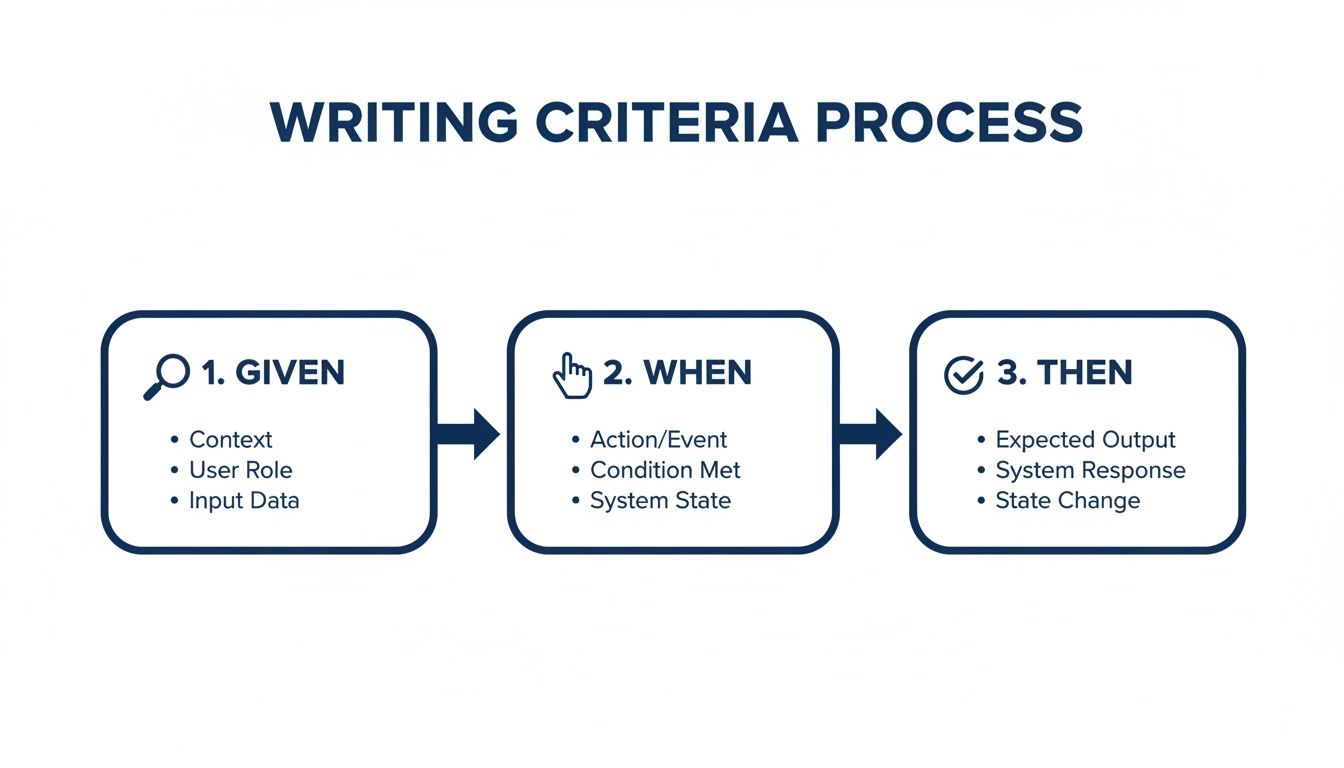
This kind of "Given/When/Then" framework helps you write crystal-clear acceptance criteria. By structuring test scenarios this way, you remove ambiguity and ensure feedback is directly tied to a specific, testable outcome.
Tools like Beep take this even further by letting testers attach visual evidence directly to their feedback. Instead of just describing an issue, a tester can add a comment right on the webpage, which automatically captures an annotated screenshot.
This approach completely eliminates guesswork. It gives developers the precise visual context they need to replicate and fix bugs in minutes, not hours.
By integrating tools like this, your user acceptance test form becomes a living document, enriched with screenshots, screen recordings, and other technical metadata. It dramatically speeds up the entire resolution cycle.
Closing the Loop with Stakeholder Sign-Off
The final piece of the puzzle is getting that official sign-off. This isn't just a formality; it's the formal acceptance from the business that the software meets their requirements and is ready to go live.
Your workflow should clearly define who needs to provide the sign-off and what criteria must be met. Typically, this means all critical and high-priority bugs found during UAT have been squashed and successfully re-tested.
Once you have that final approval, you can move to production with confidence, knowing the product has been thoroughly validated by the very people who will actually be using it.
Common UAT Form Mistakes and How to Fix Them
Even with the best intentions, a clunky user acceptance test form can totally derail your testing. I’ve seen it happen time and time again—the same predictable mistakes pop up, turning a smooth validation process into a frustrating mess for everyone.
These aren't just minor annoyances. They’re roadblocks that lead to vague feedback, blown deadlines, and a final product that doesn’t actually hit the mark. The good news? These slip-ups are completely avoidable.
Let’s walk through the most common traps I've seen and, more importantly, how you can sidestep them.
Mistake 1: Using Overly Technical Jargon
One of the fastest ways to lose your business users is to pack the form with tech-speak. Your testers from sales, marketing, or ops don't think in terms of "API endpoints" or "database validation." When they see jargon, they either tune out or give you hesitant feedback because they’re worried about sounding silly.
This mistake comes from forgetting who UAT is really for. It’s for the end-users, not the dev team.
Here’s how to fix it:
Write in plain English. Frame things in language your users actually use. Instead of "Verify the authentication token is generated," try "Confirm you can log in and see your dashboard." Easy.
Focus on business outcomes. Guide testers to validate workflows, not code. Ask them to confirm they can "complete a customer purchase" or "generate the monthly sales report."
Add a glossary if you must. If a few technical terms are unavoidable, stick a simple glossary at the top of the form. No one gets left behind.
Mistake 2: Creating a Form That Is Too Long
Tester fatigue is a very real thing. When you hand someone a user acceptance test form with hundreds of fields, their eyes glaze over almost instantly. That initial enthusiasm drains away, and testing becomes a chore they just want to finish. A form that feels like a novel will get you rushed, check-the-box answers every time.
A UAT form should be a tool, not a test of endurance. Your goal is quality feedback on critical flows, not documenting every single edge case in one shot.
To fight this, you need to think lean.
Here’s how to fix it:
Break up your testing. Instead of one marathon UAT cycle, split it into smaller, more manageable rounds. Focus on specific modules, like "User Onboarding" one week and "Checkout Process" the next.
Prioritize the critical paths. Zero in on the most important, high-impact user journeys. Trust me, not every single link and button needs its own formal test case.
Use smart defaults. Pre-fill info like the tester's name or the date whenever you can. Every click you save your tester is a small victory that keeps them engaged.
Mistake 3: Treating UAT as More Bug Hunting
This one is probably the biggest misunderstanding of the whole process. Yes, UAT often uncovers bugs, but its main purpose is validation, not just another round of QA. If your form is only built to find defects, you're missing the entire point.
The real goal is to confirm the software solves the business problem in a way that actually works for the people using it. This shift in mindset completely changes how you build your form.
Here’s how to fix it:
Frame tests around business goals. Every test case should tie back to a specific business requirement. This keeps the focus squarely on outcomes, not just broken code.
Include open-ended questions. Add a field for "General Feedback" or "Usability Comments" to each major scenario. This is where you get the gold—insights that go way beyond a simple pass/fail.
Educate your testers. At the UAT kickoff, make it crystal clear that their main job is to confirm the software helps them do their job better. This empowers them to think critically about the workflow, not just hunt for glitches.
Steer clear of these common blunders, and your user acceptance test form will transform from a simple checklist into a genuinely powerful tool for collaboration and validation.
Got Questions About UAT Forms? We've Got Answers
Even with the best-laid plans, a few questions always seem to pop up around the UAT process. That's totally normal. So, let's tackle some of the most common ones I hear from project managers and testers.
Think of this as your quick-reference guide to clear up any lingering confusion and help you nail the final stages of your project.
What’s the Real Difference Between UAT and QA Testing?
This is easily the most common point of confusion, so let's clear it up. While both are critical for a quality product, they have fundamentally different jobs.
Quality Assurance (QA) testing is usually done by a dedicated internal team. Their mission is to hunt down and squash bugs, making sure the software meets all the technical specs. They're asking, "Did we build the product right?"
User Acceptance Testing (UAT), on the other hand, is all about the end-user. Real users get their hands on the product to confirm it actually solves their problems in a real-world setting. They're asking the bigger question: "Did we build the right product?"
A product can pass every single QA test with flying colors and still completely fail UAT if it doesn't actually help users do their jobs. QA is about technical verification; UAT is about business validation.
Who's Actually in Charge of the UAT Form?
The short answer? It's a team sport. The responsibility for a user acceptance test form is shared, which is what makes it such a powerful tool for collaboration.
Here’s how the roles usually break down from my experience:
Creating the Form: This typically falls to the Product Manager or Business Analyst. They live and breathe the business requirements and are the best people to translate them into clear test scenarios and acceptance criteria.
Completing the Form: This is where the end-users or client stakeholders step in. They are the testers, the ones who will run through the test cases and fill out the "Actual Results" and "Pass/Fail" columns.
Reviewing the Form: Once the forms are filled out, the Project Manager, QA Lead, and the development team huddle up. They review the completed forms to triage bugs, prioritize what needs fixing, and ultimately get the final sign-off that the business goals have been met.
How Should UAT Forms Change for Agile vs. Waterfall?
Your UAT approach absolutely has to match your development methodology. A UAT form for a Waterfall project will look and feel very different from one used in an Agile sprint.
For Agile Sprints:UAT isn't a final "phase" here; it's a continuous activity. Forms are usually smaller and super-focused, often covering just the user stories finished in that specific sprint. The feedback loop is lightning-fast, and the results from one sprint's UAT often directly influence the planning for the very next one.
For Waterfall Projects:In a Waterfall world, UAT is a very distinct and formal stage that happens right at the end, just before the big launch. The user acceptance test form is a much bigger deal here—it's incredibly comprehensive and often covers the entire application from top to bottom. The final sign-off is a major, formal milestone that acts as the final gate before deployment.
At the end of the day, the goal is exactly the same: make sure the product delivers real value. By tweaking your UAT forms to fit your team’s workflow, you're setting yourself up for a much smoother and more successful launch.
Ready to create a seamless feedback loop that developers and testers will actually love? Beep makes it incredibly simple. Let your testers add comments directly on the webpage, automatically capturing annotated screenshots and all the technical data your team needs. Stop chasing vague feedback and start fixing bugs faster. Try it for free and see how much time you can save. Get started at justbeepit.com.
Comments