
.png)
Project Management Web Development: Essential Strategies for Planning to Launch

Let's be real: managing a web development project is the art of planning, executing, and wrangling a website from a simple idea into a live, functioning product. It’s the structured approach that takes a brilliant concept and turns it into a high-quality digital experience, all while keeping things on schedule and within budget. This guide is your modern, no-fluff playbook for handling that entire lifecycle.
Why a Disciplined Approach Is Your Biggest Asset
Trying to launch a web project without a solid plan is like navigating a minefield blindfolded. The path is littered with potential disasters—missed deadlines, blown budgets, and the all-too-familiar "scope creep." A disciplined project management process isn’t about just ticking off boxes on a checklist. It's about creating a predictable, transparent workflow that cuts down on risk and sets you up for a win.
Historically, project delivery has been a massive headache. The stats are pretty grim: only about 35% of projects are actually completed successfully on time and on scope. But here’s the kicker: that same research shows that 77% of high-performing projects rely on project management software. The connection between having the right tools and getting the right results is crystal clear.
Core Benefits of Structured Web Project Management
A structured process brings some much-needed order to the creative chaos of building a website. It becomes the single source of truth that gets stakeholders, designers, and developers all pulling in the same direction. Trust me, that alignment is everything when you're trying to turn a vision into a real, tangible product.
The benefits are obvious and easy to measure:
Improved Clarity and Alignment: Everyone, from the client to the junior dev, knows the goals, the deliverables, and exactly what they’re responsible for. No more guessing games.
Enhanced Budget and Timeline Control: When you define the scope upfront and track progress against milestones, you can spot problems early and keep costs from spiraling out of control.
Reduced Scope Creep: Having a formal way to handle change requests stops those "can you just add this one little thing?" moments from derailing the entire project.
Higher Quality Output: With dedicated phases for QA, testing, and feedback, the final product is polished, functional, and actually meets what users expect.
At its core, great project management is the bridge between a brilliant idea and a successful launch. It provides the guardrails that keep creative and technical teams focused on delivering value, not just features.
To get a better handle on the key functions and expectations for anyone in this role, checking out the 7 Core IT Project Managers' Responsibilities is a great place to start. This guide will build on those fundamentals, giving you a step-by-step playbook you can put into action right away.
Scoping, Planning, and Setting Project Milestones
Let's be honest: a web development project's fate is often sealed long before anyone writes a single line of code. It all happens right here, in the planning phase. This is where a client's big idea gets translated into a concrete, actionable blueprint. I've seen it happen too many times—a poorly defined scope is the number one reason projects go over budget and blow past deadlines. Getting this stage right is your best defense against chaos.
It all starts with a rock-solid scope document. Think of this as the constitution for your project. It lays out the rules, boundaries, and deliverables that everyone, from stakeholders to developers, has to agree on. The foundation of successful web projects lies in comprehensive project planning, making sure you've thought through every angle from the very beginning.
This document is your shield against scope creep—that silent project killer where small, undocumented requests slowly pile up, bloating the project's complexity, timeline, and cost. When you get everything down in writing, you create a single source of truth for any future chats about new features or changes.
Defining Clear Deliverables with the Right Questions
To build a scope that actually works, you need to put on your detective hat. Your mission is to get past vague requests like "a modern-looking e-commerce site" and nail down specific, measurable outcomes. You have to ask the right questions. This initial discovery process is everything for aligning expectations and sniffing out potential roadblocks before they become major problems.
Here are some of the go-to questions I always ask to get the conversation rolling:
Business Goals: What are we really trying to achieve here? Is the goal to boost online sales by 20%, generate more qualified leads, or make customer support more efficient?
Target Audience: Who are we building this for? What are their tech skills like, and what problem are they trying to solve when they land on the site?
Core Functionality: What are the absolute, non-negotiable must-have features? For an e-commerce site, that’s your product pages, a shopping cart, and a secure checkout. No debate.
Technical Constraints: Are there any existing systems we need to play nice with? A specific CRM or inventory management software, for example.
Success Metrics: Six months after launch, how will we know if we've succeeded? This forces the client to think about tangible results beyond just "getting the site live."
The answers you get become the building blocks for your scope document, giving you the clarity you need to make accurate estimates.
Breaking Down the Project into Milestones
Once the scope is clear, you can start carving up the project into manageable pieces. A giant task like "Build New E-commerce Platform" is just plain intimidating and impossible to estimate. Instead, you break it down into major milestones.
Milestones aren't tasks; they're significant checkpoints that mark the completion of a major chunk of work. They’re the big wins along the way.
For example, instead of one massive project, you create a series of milestones like 'User Account System Complete,' 'Product Catalog Functionality Live,' and 'Checkout and Payment Gateway Integrated.' This approach makes progress feel real and gives the team clear goals for each phase.
This structure helps stakeholders see tangible progress and gives your development team achievable, short-term targets. It turns a marathon into a series of manageable sprints.
Estimating Effort and Building a Realistic Timeline
With your milestones defined, you can break them down even further into specific tasks and user stories. A user story is just a simple, plain-language description of a feature from the user's perspective. For instance: "As a customer, I want to be able to save items to a wishlist so I can purchase them later."
For every task, you'll need to estimate the time it'll take for:
Design: Wireframing and creating the visual mockups.
Development: Both frontend (what the user sees) and backend (all the server-side logic).
QA Testing: Hunting down and squashing bugs before a feature gets the green light.
By estimating each piece separately and adding a buffer for the inevitable surprises (a 15-20% contingency is pretty standard), you can build a timeline and budget that you can actually stick to. This detailed estimation is the bedrock of good project management, ensuring you can deliver on your promises without burning out your team or your budget.
Executing with Agility and Managing Sprints
Okay, you've got your detailed plan locked and loaded. Now it's time to switch gears from strategy to actually building something. This is where the agile methodology really gets to shine, letting your team build, test, and adapt in short, focused cycles we call sprints.
Forget thinking about web development as a straight line from A to Z. It’s all about building momentum and tackling challenges as they pop up.
Sprints are basically the heartbeat of any agile project. They typically last anywhere from one to four weeks, and each one is its own mini-project. The team commits to a specific set of tasks from the backlog with the goal of shipping a small, usable piece of the product by the end. This whole process keeps things moving in measurable steps and stops the team from getting buried in one giant, endless development phase.
Running Effective Sprint Planning Meetings
Every single sprint kicks off with a planning meeting. And no, this isn't just another pointless calendar invite. It's a critical moment for the project manager, product owner, and the dev team to get on the same page about what can realistically get done.
The team will pull the highest-priority user stories from the backlog, chop them up into smaller tasks, and estimate how much effort each one will take.
The key to a good meeting here is being brutally honest with yourselves. Everyone needs to agree on a sprint goal—a super simple summary of what the sprint will deliver, like "Implement user registration and login functionality." This shared mission gives everyone focus and a clear finish line for the next couple of weeks. If you want to really nail this part, our guide on crafting a productive sprint planning meeting agenda is a fantastic starting point.
Visualizing Work with Kanban Boards
Once the sprint is underway, a Kanban board becomes your command center. I don't care if you're using Jira, Notion, or a physical whiteboard—the visual power of a Kanban board is its biggest strength. It gives you a bird's-eye view of the entire workflow, making it dead simple to track progress and spot problems before they throw the whole sprint off course.
A pretty standard Kanban setup for a web dev team looks something like this:
Backlog: All the user stories and ideas for the entire project live here.
To Do (Sprint): The specific tasks your team has committed to for this sprint.
In Progress: What developers are actively coding right now.
In Review / QA: Code is done, and it's now waiting for a peer review or for the QA team to hammer on it.
Done: It's finished, tested, approved, and ready to ship.
This simple layout creates a crystal-clear path for every task. Trust me, when you see a bunch of tasks getting stuck in the 'In Review' column, it's an immediate red flag that your QA process might be a bottleneck that needs fixing, fast.
A well-run Kanban board does more than just track tickets. It builds a culture of transparency and accountability. Everyone on the team can see who’s doing what and how their own work fits into the bigger picture.
Daily Stand-Ups to Maintain Momentum
To keep everyone in sync, you absolutely need daily stand-up meetings. These are quick, 15-minute check-ins where each person answers three simple questions:
What did I get done yesterday?
What am I working on today?
Is anything blocking me from making progress?
The point here isn't to micromanage. It's all about opening up communication lines and solving problems on the fly. If a developer is stuck waiting on a design file or an API key, the stand-up is the perfect time to raise that flag. It lets the project manager jump in and clear the path, making sure the sprint stays on schedule.
By combining structured sprint planning, the visual clarity of a Kanban board, and the daily rhythm of stand-ups, you create a seriously powerful system for getting things done. This agile framework turns your project plan from a static document into a living, breathing process, empowering your team to deliver great work and roll with the punches that web development inevitably throws your way.
Streamlining Feedback and Bug Reporting
Client feedback is a double-edged sword. Let's be honest. When it’s good, it’s great—it sharpens the final product and helps you move faster. But when it's bad? It's a chaotic storm of vague emails, confusing spreadsheets, and endless follow-up calls that can bring a project to a grinding halt.
The secret isn't to avoid feedback, but to build a process that handles it. The goal is to make it incredibly simple for stakeholders to report issues and for your developers to understand them instantly. No more lengthy back-and-forth trying to figure out what they mean by "the button is broken."
Adopting a Visual-First Approach
Forget trying to decipher long email chains describing a bug. There’s a much better way. I’m a huge advocate for using visual feedback tools that let clients and QA testers comment directly on a live staging site.
Imagine a stakeholder clicking on an element, dropping a pin, and writing, "This button color is off." All the guesswork is gone. The best tools will even automatically capture a screenshot with that comment, giving you immediate visual context.
This approach also solves another massive headache: it automatically grabs all the crucial technical data with each report. This includes things like:
Browser and Version: Instantly know if a bug is specific to Chrome, Firefox, or Safari.
Operating System: See if an issue is only happening on Windows versus macOS.
Screen Resolution: Understand exactly what the user saw on their specific screen size.
This technical metadata is a game-changer for developers. It saves them so much time they’d otherwise spend trying to replicate the user's environment. It turns a vague complaint into an actionable bug report.
From Feedback to Actionable Tasks
Once feedback starts rolling in, the next job is triage. Not every comment is a critical, drop-everything bug. A project manager’s role is to sort this input into clear categories, preventing the development backlog from becoming a disorganized mess.
The most crucial distinction you can make is between a genuine bug (something is broken) and a new feature request (a new idea). A clear process here protects your original project scope while still capturing valuable ideas for later.
For example, a comment saying, "The checkout button doesn't work," is a high-priority bug. On the other hand, a comment like, "It would be great if we could add a one-click PayPal option," is a feature request. The bug goes straight into the current sprint's backlog, while the feature request gets logged for a future planning discussion. This is how you prevent scope creep and keep the team focused.
This diagram shows how a task moves through the stages of a typical agile sprint, from planning all the way to completion.
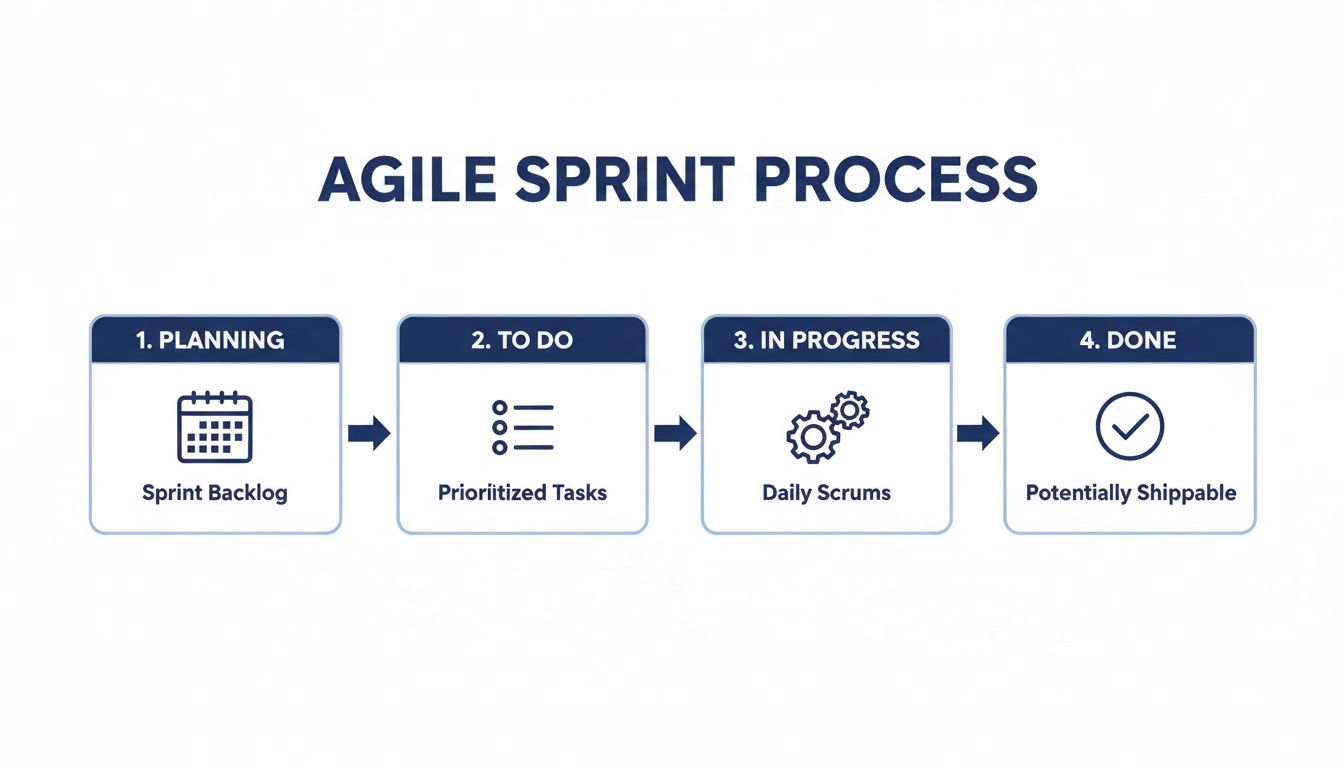
This kind of visual workflow is essential for tracking feedback as it gets turned into tasks and resolved by the dev team. With the global web development market estimated at USD 74.69 billion in 2025 and projected to hit USD 104.31 billion by 2030, efficiency is everything. When you consider that roughly 252,000 new websites are created every single day, you can see why solid workflows are non-negotiable. You can dive deeper into these web development statistics and market trends to really grasp the scale of the industry.
By creating this closed-loop system—from visual report to triaged task to resolution—you transform feedback from a source of friction into a valuable part of your quality assurance process. It's a foundational piece of modern web development project management that brings clarity and efficiency all the way from problem discovery to deployment.
Integrating Your Tools for a Seamless Workflow
Your team's efficiency isn't just about raw talent—it’s about how well your tools talk to each other. When your platforms are disconnected, you’re basically creating manual work, leaving the door open for miscommunication and all sorts of confusion. The real win is building a connected ecosystem where info flows automatically between the tools your team already lives in.
Think about it. Every time a developer has to manually copy-paste a bug report from an email into Jira, you're losing precious minutes. When a project manager has to ping a designer on Slack for an update that's already sitting in Notion, you're creating friction. These little hiccups seem small, but they add up, dragging down your entire development cycle.
The goal is to kill these manual touchpoints. Imagine a client leaving visual feedback on a staging site, and a detailed ticket automatically pops up in your project management board, assigned to the right person, without anyone lifting a finger. This isn't just a fantasy; it's how modern web dev teams stay ahead.
Connecting Visual Feedback with Project Management
The single most powerful integration you can set up is the one between your visual feedback tool and your project management software. This is the bridge that connects what a stakeholder sees directly to your development workflow. It creates one single, undeniable source of truth.
For example, when a QA tester spots a bug and drops a comment using a tool like Beep, a native integration can kick things off instantly. Instead of just a notification, it can create a fully fleshed-out task in your Kanban board.
This task can automatically pull in:
The stakeholder’s original comment, word-for-word.
A direct link back to the exact element on the page where they left the feedback.
A screenshot for immediate visual context.
All the critical browser and OS metadata your devs need to start debugging.
That direct link is a total game-changer. Developers stop wasting time hunting down the issue and can see the problem exactly as the user saw it, in its original context.
Automating Communication and Notifications
Beyond just creating tasks, integrations can put your team's communication on autopilot. You can set up custom rules to keep everyone in the loop without drowning them in noise.
Just picture these scenarios:
Slack Integration: A new high-priority bug report from a client could instantly fire off a message to a dedicated channel in Slack, getting eyes on it immediately.
Notion Integration: A designer marks a mockup as "Ready for Dev" in Beep, and the corresponding task in the team's Notion database automatically updates to reflect that, signaling it's time for handoff.
Zapier for Custom Workflows: For anything more complex, a tool like Zapier acts as a universal translator between your apps. You could build a "Zap" that logs every single piece of client feedback into a Google Sheet for historical tracking and analysis.
The real power of integration is creating an automated, intelligent system. Your tools should be working for you, not the other way around. This slashes the administrative overhead and frees up your team to focus on what they actually do best: building incredible web experiences.
As web development and project management become more intertwined, the right tools are everything. Research shows that 82% of companies are already using project management software to get more done. With this market projected to hit $15.06 billion by 2030, plugging these platforms together is non-negotiable for productivity. You can dive deeper into the growth of project management software.
Picking platforms that play well with others is a crucial first step. If you're weighing your options, our roundup of the 12 best agile project management tools for 2025 is a great place to see what tools are built for this kind of connected workflow.
Managing QA, Deployment, and Post-Launch Success
Alright, let's talk about crossing the finish line. You've made it through the chaos of development, but the final push is where projects are either made or broken. This is where all that meticulous planning and those agile sprints really pay off, but only if you nail the final stages of quality assurance (QA) and deployment. The goal isn't just to launch a website; it's to launch it flawlessly and set it up for the long haul.
The final phases are a flurry of activity. You're shifting gears from building features to trying to break them. This whole transition needs to be super structured to catch every little gremlin before it ever sees a real user. It all starts with your own internal testing and ends with getting that all-important client sign-off.
Structuring User Acceptance Testing
Before you even dream of hitting that "go live" button, you need the client's formal stamp of approval through User Acceptance Testing (UAT). This is where the key stakeholders get their hands dirty and confirm that the site actually meets the business needs we all agreed on months ago. It's their final chance to kick the tires.
To make UAT actually useful, don't just tell them to "test the site." Give them specific scripts to follow. Instead of a vague "test the checkout," hand them a scenario like, "Add product X and product Y to your cart, apply the 'SUMMER25' discount code, and complete the purchase using this test credit card number." This approach ensures every critical user path gets vetted and gives you clear, actionable feedback—not just vague opinions.
Think of UAT as the final exam for your project. When you run it well, you build a ton of client confidence and get the formal sign-off you need to deploy. No more last-minute surprises.
The Pre-Launch Checklist
A smooth deployment doesn't happen by accident. It’s the result of a systematic, almost obsessive, pre-launch checklist. I've seen too many teams rush this step and then spend the first week post-launch putting out fires. Don't be that team. Work through a comprehensive list that covers every technical and functional base.
This isn't just about hunting for bugs; it's a complete review of the entire product. To make sure you're not missing anything, you can use a detailed guide like The Ultimate QA Checklist for Website Launches to see the core areas you need to focus on.
Your checklist should absolutely include verification for:
Final Code Reviews: Is the code clean, consistent, and documented? This is the last chance to ensure quality standards are met.
Performance Testing: Check your page load speeds and server response times. See how the site holds up under a bit of stress.
Security Audits: Scan for the usual suspects like XSS and SQL injection. You have to protect your client's and their users' data.
Cross-Browser Compatibility: Make sure the site looks and works great on Chrome, Firefox, Safari, and Edge—on both desktop and mobile.
Post-Launch Monitoring and Handover
Your job isn't done the second the site goes live. The first few days are absolutely critical for monitoring how the site performs in a real-world environment. Get some monitoring tools set up to track uptime, server health, and any user-facing errors that pop up.
Finally, a smooth handover is essential, whether it's to the client or an internal maintenance team. This means providing crystal-clear documentation, all the necessary access credentials, and straightforward instructions for future updates and support. It’s the final step to ensuring the website you worked so hard to build continues to succeed long after your project team has moved on.
Got Questions? I’ve Got Answers.
When you’re deep in the trenches of web development project management, the same questions tend to pop up. Here are some of the most common ones I hear, along with some straight-up advice from my own experience.
What’s the Best Project Management Methodology for Web Dev?
Everyone's looking for that one magic bullet, but the truth is, there isn't one. However, the hands-down favorite for most web development projects is Agile—specifically frameworks like Scrum and Kanban. Why? Because building for the web is never a straight shot from A to B.
Things change. Clients have new ideas. Market feedback rolls in. Agile’s iterative style is built for exactly that kind of controlled chaos, letting your team adapt on the fly and deliver value in small, consistent chunks.
Scrum is your go-to for bigger, feature-heavy builds. Its time-boxed sprints and clearly defined roles create a steady rhythm that keeps the project moving forward predictably.
Kanban is a lifesaver for managing continuous work. Think ongoing maintenance, support tickets, and those pesky bug fixes that pop up. It’s all about visualizing workflow and adapting priorities as they come.
Honestly, the best choice really boils down to your team's size, the project's complexity, and how involved your client wants to be. Plenty of top-tier teams I know use a hybrid "Scrumban" approach to get the structure of Scrum with the flexibility of Kanban.
How Do You Actually Handle Scope Creep?
Let’s be real, scope creep is the silent killer of project timelines and budgets. The best way to fight it is to stop it before it even starts. That means having a ridiculously detailed scope document from day one and a formal change request process that is absolutely non-negotiable.
When a client asks for a new feature after the plan is locked in, it can't be just a casual "hey, can you add this?" conversation. It has to go through the official process. That request then gets properly estimated to show exactly how it will impact the timeline and the budget.
This turns the conversation from a casual request into a business decision. Instead of "sure, we can add that," it becomes, "Here’s the impact on cost and delivery date for this new request. How would you like to proceed?" That clarity is your single greatest defense against a project spinning out of control.
What Are the Must-Have Roles on a Web Dev Project Team?
While you can find teams of all shapes and sizes, a few core roles are pretty much essential to get a project from an idea to a live website. Each one brings a critical piece of the puzzle to the table.
A solid team almost always has:
Project Manager: The person who keeps the whole train on the tracks. They own the timeline, manage communication, and clear roadblocks for the team.
UI/UX Designer(s): The architects of the user’s journey. They're obsessed with making sure the site not only looks great but is also intuitive and a breeze to use.
Frontend Developer(s): These are the folks who build everything the user actually sees and clicks on in their browser. They bring the design to life.
Backend Developer(s): The engineers working behind the scenes. They manage the server, the database, and all the logic that makes the site function.
QA Tester/Engineer: The guardian of quality. Their job is to hunt down bugs, test every feature, and make sure the final product is rock-solid.
Sure, in smaller setups, one person might wear a couple of these hats. But these five functions are the bedrock of any team that wants to ship great work.
Ready to stop juggling spreadsheets and email chains? Beep brings visual feedback, bug reporting, and your favorite project management tools into one seamless workflow. Get started for free and see how much faster your team can move.
Comments