
.png)
7 Game-Changing Sample Trello Boards to Supercharge Your Workflow in 2026

Staring at a blank Trello board can feel daunting, a familiar hurdle for product managers, designers, and marketers alike. You know organization is key, but building an effective workflow from scratch is a significant time investment. This is precisely where the power of sample Trello boards comes into play. Instead of reinventing the wheel, you can adopt and adapt proven frameworks for everything from sprint planning and UX research to complex marketing calendars and client onboarding.
This curated listicle dives deep into the best sources for finding these powerful templates. We move beyond a simple list of links, offering a strategic breakdown for each resource. You’ll find screenshots, direct links, and a clear analysis of ideal use cases. We will explore official sources like the Trello Community Template Gallery and independent marketplaces such as Gumroad and Etsy, as well as custom services on Fiverr.
Crucially, we'll show you not just what these boards are, but how their underlying logic works. This guide provides actionable takeaways on adapting these successful workflows. The goal is to help you find the perfect starting point to transform a chaotic process into a streamlined system, fast.
1. Product Roadmap Board
A product roadmap is the strategic compass for any development team, providing a high-level visual summary that maps out the vision and direction of your product over time. This sample Trello board is designed to communicate the "why" behind what you're building, aligning stakeholders, development teams, and leadership around a single source of truth. It moves beyond simple task lists to focus on strategic goals and feature initiatives.
This board's structure is intentionally straightforward, making it one of the most popular sample Trello boards for product managers seeking clarity and buy-in. It organizes the product's future into distinct time horizons, which provides a clear yet flexible overview of the development trajectory.

Board Structure and Workflow
This Trello board template typically uses a time-based list structure to map out the product's evolution. The columns are often organized to represent different planning phases, creating a clear visual timeline.
Product Goals/OKRs: A foundational list that anchors the roadmap. Each card represents a key objective or result, ensuring every feature on the board ties back to a strategic business goal.
Next Up (Q1): Features and initiatives planned for the immediate future. Cards here are well-defined, with user stories and preliminary specs attached.
Coming Soon (Q2): Items slated for the following quarter. These cards are less detailed, representing validated ideas that are next in the prioritization queue.
Future (H2): A long-term backlog for bigger ideas, epics, or potential projects. This list acts as a parking lot for concepts that require more research and validation.
Launched: A record of completed features and milestones. This column is crucial for tracking progress and celebrating wins with the team.
Actionable Takeaway: How to Adapt This for Your Workflow
The power of this board lies in its simplicity and strategic focus. To adapt it, use Trello’s "Custom Fields" Power-Up to add data points like Impact Score, Effort Level, or Target Persona to each card. This transforms a simple list into a powerful prioritization tool.
Pro Tip: Use labels to categorize features by theme (e.g., 'User Engagement', 'Performance', 'New Integration'). This allows stakeholders to quickly filter the board and see how initiatives align with different strategic pillars, making roadmap discussions more efficient and data-driven.
2. Atlassian Community Learning – "Use Trello board templates"
Instead of offering a direct gallery, Atlassian Community Learning provides something more foundational: an official guided lesson on how to find, select, and implement Trello's vast library of templates. This resource is perfect for teams who are new to Trello or want to ensure they are adopting best practices from the start. It demystifies the process of using sample Trello boards by teaching users how to leverage the official template library effectively.
This platform's value comes from its role as an educational launchpad. Rather than just presenting a finished board, it empowers users with the knowledge to explore templates for project management, client workflows, and agile development on their own. The free, on-demand training ensures that the guidance is always aligned with Trello's current product features and interface.

Board Structure and Workflow
This resource doesn't provide one specific board; instead, it teaches you how to find and use any of them. The lesson guides you through the official Trello template gallery, where boards are typically organized by function or industry. For example, a common structure you'll learn to find is the basic Kanban workflow, which you can read about in this guide to effective web Kanban boards.
Template Gallery Navigation: The first step is learning how to browse and filter the extensive library by categories like 'Marketing', 'Sales', or 'Engineering'.
Template Selection: The lesson shows how to preview templates to understand their list structures (e.g., To Do, Doing, Done) and pre-filled example cards.
Board Creation: Users are walked through the simple one-click process of creating a new board from a chosen template.
Customization: It emphasizes that templates are a starting point, encouraging users to rename lists, edit cards, and add Power-Ups to fit their specific needs.
Sharing with Team: The final part of the workflow is sharing the newly created board to get the entire team aligned and onboarded quickly.
Actionable Takeaway: How to Adapt This for Your Workflow
The key takeaway is to use this lesson as a team-wide onboarding tool. Before your team starts a new project, have everyone complete this short Atlassian course. This ensures everyone understands the fundamentals of using templates, which prevents inconsistencies and helps the team collectively decide on the best structure for your project from the very beginning.
Pro Tip: After completing the lesson, challenge your team to find three different templates from the official Trello gallery that could potentially work for your next project. Discuss the pros and cons of each as a group to collaboratively build a hybrid board that perfectly matches your team's unique workflow.
3. Etsy – Trello Template Marketplace
Beyond official galleries, Etsy has emerged as a surprisingly rich marketplace for highly specialized and niche Trello board templates. Independent creators, often Trello power users and industry professionals, sell pre-configured boards for workflows that are too specific for mainstream collections. This platform is ideal for finding a sample Trello board tailored to unique industries like real estate, academic research, or even personal life planning.
The value of Etsy lies in its sheer variety and the real-world experience baked into many of its offerings. Instead of a generic project management board, you can find a template designed by a wedding planner for client management or a social media manager's content approval system, complete with established automations and checklists. These are often sold as instant digital downloads, providing a link to copy the board directly into your Trello account.
Board Structure and Workflow
Because Etsy is a marketplace, structures vary wildly by seller and use case. However, most high-quality templates share a common goal: to provide a turnkey workflow system that saves you hours of setup time. A common example, like a Client Onboarding Board, might include:
Template Card/Instructions: A foundational card explaining how to use the board, customize it, and leverage any included Power-Ups or Butler automations.
New Inquiries: A pipeline starting point where cards for potential clients are placed. Often integrated with a form tool like Trello's Wufoo or Jotform Power-Up.
Onboarding Phase: A series of lists that guide a new client through setup, such as ‘Contract Sent,’ ‘Payment Received,’ ‘Intake Form Complete,’ and ‘Kickoff Call Scheduled.’
Active Clients: Where ongoing project management takes place.
Offboarding/Completed: Lists to manage project wrap-up, final payments, and requests for testimonials, ensuring a smooth end-to-end client experience.
Actionable Takeaway: How to Adapt This for Your Workflow
The key to leveraging Etsy is to treat these templates as advanced starting points, not final products. Before purchasing, carefully read the description to see which Power-Ups (e.g., Custom Fields, Butler, Calendar) are used. Once you copy the board, spend time deconstructing the pre-built Butler rules to understand the automation logic. You can then tweak these rules to perfectly match your team’s notification preferences and process triggers.
Pro Tip: Look for listings that are sold in bundles. Many sellers offer packages like a "Marketing Team Bundle" that includes boards for a content calendar, campaign tracker, and social media planner. This ensures consistency in structure and labeling across your department's workflows and is often more cost-effective.
4. Gumroad – Independent template storefronts
Unlike centralized marketplaces, Gumroad offers a creator-driven ecosystem where independent authors sell their own unique Trello board templates directly to users. This platform is a treasure trove for finding hyper-specific or niche workflows designed by experts in fields like marketing, content creation, and software development. It moves beyond generic templates to provide tailored systems, often bundled with author notes or lifetime updates.
The primary appeal of Gumroad is its direct-from-the-creator model. You are not just buying a template; you are often buying into a specific person's productivity system. This provides a level of detail and specialization that is hard to find elsewhere, making it a go-to source for highly customized sample Trello boards.
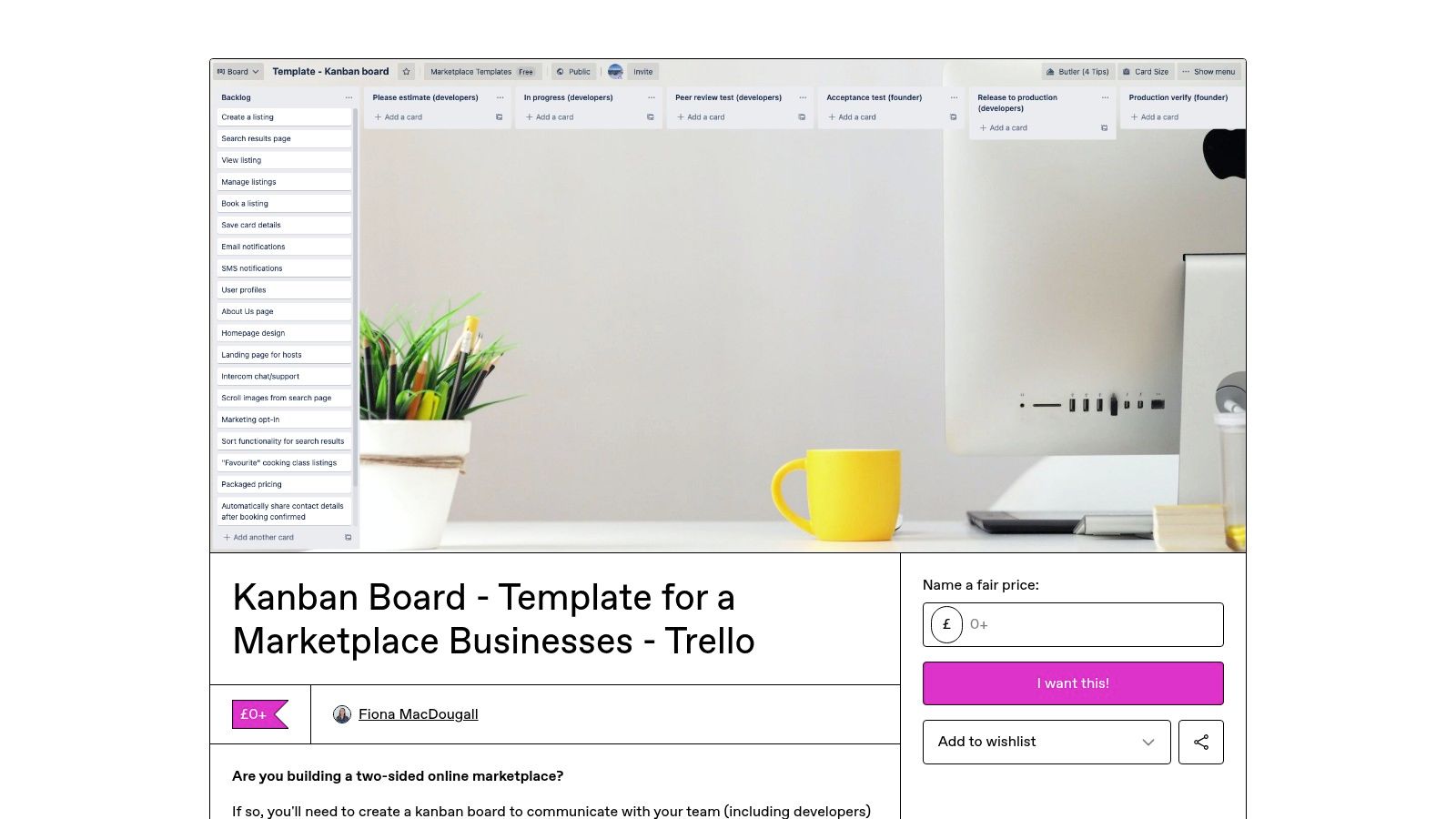
Board Structure and Workflow
Because Gumroad is a marketplace of individual sellers, the board structures are incredibly diverse. However, many successful templates follow a similar pattern, offering a comprehensive, end-to-end system for a specific function. A common example is a digital product launch board.
Ideation & Research: A list for brainstorming product ideas, validating market demand, and competitor analysis. Cards here might represent potential features or target audience segments.
Pre-Launch Marketing: This column holds all tasks related to building buzz before the product is live, such as social media announcements, email list building, and content creation.
Launch Week: A detailed, day-by-day checklist for the launch period. Cards are often granular, covering everything from "Publish blog post" to "Engage with comments."
Post-Launch & Analysis: This list tracks tasks for after the launch, including collecting customer feedback, analyzing sales data, and planning future updates.
Resources & Swipe Files: A common value-add where creators include helpful links, pre-written copy, or other assets directly in the board.
Actionable Takeaway: How to Adapt This for Your Workflow
The key to using Gumroad effectively is to look for templates that solve a specific, complex problem you face. Once you find a board, don't just copy it-deconstruct it. Analyze the creator's workflow and adapt the underlying logic, not just the list names, to fit your own processes.
Pro Tip: Before purchasing, carefully read the product description on the Gumroad page. Look for details on what’s included (e.g., tutorials, lifetime updates, detailed card descriptions) and check the seller’s profile for reviews or other products. This due diligence ensures the template’s quality and relevance to your needs.
5. Fiverr – Custom Trello template/board setup services
When off-the-shelf sample Trello boards don't quite fit your unique workflow, turning to a marketplace like Fiverr offers a powerful alternative. Instead of adapting a generic template, you can hire a freelancer to design and configure a bespoke Trello board tailored precisely to your team's processes. This is ideal for complex projects, integrated systems, or teams that need advanced automation.
This approach moves beyond simple board structures to a fully implemented system. Freelancers on Fiverr often provide end-to-end services, from initial workflow mapping to setting up Butler automations, Power-Ups, and integrations with tools like Slack, Jira, or Notion. It's a "done-for-you" solution for teams that want to leverage Trello's full potential without a steep learning curve.
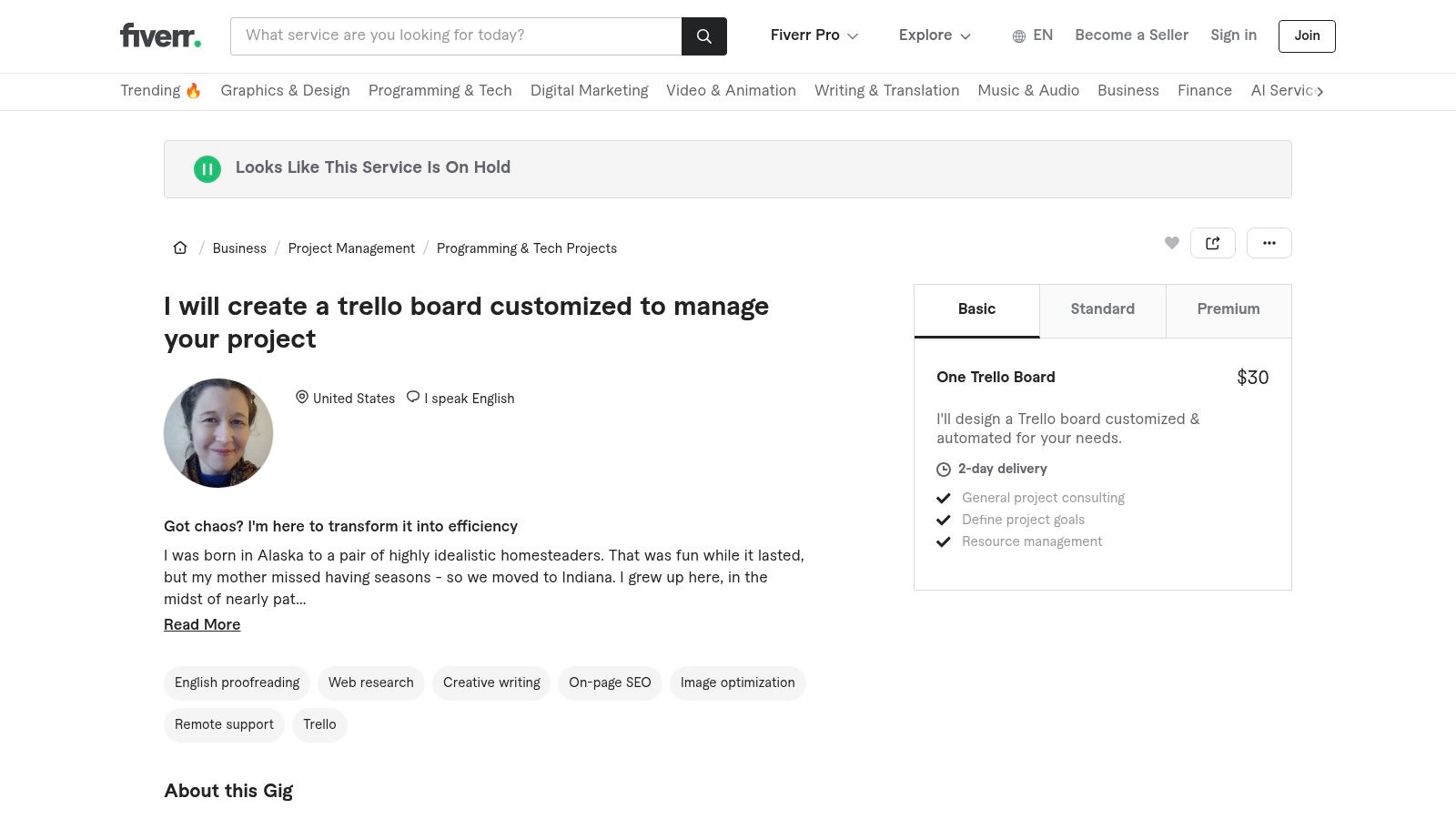
Board Structure and Workflow
Because the service is custom, the board structure is entirely dependent on your needs. A freelancer will typically consult with you to map out your specific workflow and translate it into a logical Trello setup. Common custom-built boards include:
Advanced Client Management: Boards that integrate forms for new leads, automate card creation, and use checklists to standardize client communication. For effective client management, utilizing a robust client onboarding process template is crucial for lasting partnerships, and a freelancer can build this directly into your Trello workflow.
Multi-Team Project Hub: A central board connected to several departmental boards (e.g., Marketing, Development, Sales) using mirroring or automation to sync relevant cards and updates.
Automated Content Pipeline: A content creation board where moving a card from "Writing" to "Editing" automatically assigns the editor, adds a checklist, and notifies the team in Slack.
Agile Development with Jira Sync: A Trello board for project managers that syncs two-ways with a development team's Jira instance, keeping stakeholders updated without needing Jira access.
Actionable Takeaway: How to Adapt This for Your Workflow
The key to success on Fiverr is providing a clear and detailed brief. Before hiring a freelancer, map out your current workflow on paper or in a simple document. Identify the steps, the people involved, the tools you currently use, and most importantly, the bottlenecks you want to solve. This preparation ensures the freelancer understands your goals and can build a Trello board that genuinely improves your process.
Pro Tip: Look for freelancers who offer a consultation call as part of their package. Use this time to not only explain your needs but also to gauge their understanding of your industry and workflow. Ask to see examples of similar sample Trello boards they have created for other clients to ensure their style and expertise align with your vision.
6. Cheerful Productivity Shop
Cheerful Productivity Shop offers a unique approach to Trello templates by bundling them with in-depth, step-by-step video training. This platform moves beyond providing a simple board structure and instead delivers a comprehensive operational system. It's designed for small business owners, freelancers, and solopreneurs who need an all-in-one hub to manage everything from content planning and standard operating procedures (SOPs) to client work and asset organization.
This approach is particularly effective because it addresses a common pain point: adopting a new system. By pairing a pre-built, robust Trello board like the "Business Hub HQ" with guided video walkthroughs, the shop significantly reduces the user's ramp-up time. This makes it an excellent resource for those looking for sample Trello boards that come with a built-in implementation plan.

Board Structure and Workflow
The templates from this shop, like the popular "Business Hub HQ," are structured as holistic dashboards rather than single-purpose boards. They use a hub-and-spoke model where a central board links out to other specialized boards, creating an interconnected business ecosystem.
HQ Dashboard: The main list acts as a command center with cards linking to critical business areas. This often includes links to other Trello boards for content, clients, or finances.
Business Pillars (e.g., Marketing, Operations, Finances): Each pillar gets its own list. Cards within these lists might contain SOPs, links to key documents, or recurring task checklists.
Quick Links & Resources: A dedicated list for frequently accessed assets, brand guidelines, and important URLs. This prevents time wasted searching for information.
Idea Inbox: A space to quickly capture ideas, tasks, or notes before they are organized into the appropriate pillar or project board.
Recurring Tasks: A list for managing daily, weekly, or monthly operational tasks, often utilizing Trello's automation features.
Actionable Takeaway: How to Adapt This for Your Workflow
The true value here is the "system-in-a-box" concept. To adapt this, think beyond a single board and consider creating a central "HQ" board for your team or department. Use cards on this main board not just as tasks, but as gateways that link to other dedicated Trello boards for specific projects, client portals, or team functions. This keeps your primary workspace clean while providing organized access to your entire workflow.
Pro Tip: Embrace the video training model for your own team. When you create a new Trello workflow, record a short screencast (using a tool like Loom) explaining how the board works, what each list is for, and the team's conventions. Attach this video to a "How to Use This Board" card and pin it to the top of the first list to accelerate adoption and ensure consistency.
7. Organize With Boards – Ready-to-use "Work & Business" Trello board
For individuals and small teams seeking an immediate, no-fuss organizational system, Organize With Boards offers a pre-built "Work & Business" Trello board template. This solution is designed for professionals who want to skip the setup process and dive straight into a structured workflow. It provides a practical, opinionated layout for managing daily tasks, long-term goals, and meeting notes without the complexity of building a board from scratch.
This template's appeal lies in its simplicity and affordability. It's a single-purchase product delivered via PDF with a direct link to copy the Trello board, making it one of the fastest sample Trello boards to implement. The focus is on providing a ready-made structure that covers the most common professional needs, from weekday planning to idea capture.
Board Structure and Workflow
The template is logically divided into sections that manage different aspects of a professional's work week, functioning as a personal command center. It uses a combination of time-based and status-based lists to keep work flowing smoothly.
Goals & Key Information: This starting list holds high-level objectives and essential information, ensuring your primary focus is always visible.
Meetings & Notes: A dedicated space to track upcoming meetings and store notes from past ones, keeping all communication-related context in one place.
This Week (Mon-Fri): A straightforward set of lists, one for each day of the workweek, for time-blocking and daily task management.
Task Queues (To Do, In Progress, Done): Classic Kanban-style lists for managing the flow of tasks that aren't tied to a specific day.
Ideas & Later: A backlog for brilliant ideas, resources to review, and tasks to tackle in the future.
Card Templates: This list contains reusable card templates (e.g., 'New Task', 'Meeting Agenda') to standardize your workflow and save time.
Actionable Takeaway: How to Adapt This for Your Workflow
This board is an excellent foundation for personal productivity or managing a small team's tasks. To enhance it, integrate Trello's "Card Repeater" Power-Up on the 'Card Templates' list to automatically create recurring tasks, like generating a "Weekly Review" card every Friday. This automates routine duties and ensures nothing falls through the cracks.
Pro Tip: While this board is a great starting point, consider how it complements other tools in your stack. For a comprehensive overview of how different platforms compare, see this review of the best task management software for teams. This will help you decide if a simple board or a more complex system is right for you.
7 Sample Trello Boards Comparison
Item | Implementation Complexity 🔄 | Resource Requirements ⚡ | Expected Outcomes 📊 | Ideal Use Cases 💡 | Key Advantages ⭐ |
|---|---|---|---|---|---|
Trello Community Template Gallery (official) | Low 🔄 — one-click duplicate; occasional Power-Up setup | Minimal ⚡ — free to browse/copy; Trello account; paid Power-Ups optional | Immediate, proven board setups for common workflows 📊 | Quick project starts, standard PM/agile templates | Large curated library; instant copy; free access ⭐ |
Atlassian Community Learning — "Use Trello board templates" | Low–Moderate 🔄 — guided lesson, step-by-step | Low ⚡ — Atlassian account and time to learn | Better adoption and correct usage of templates 📊 | Team onboarding and training before rollout | Official, concise training aligned with product ⭐ |
Etsy — Trello template marketplace | Variable 🔄 — copy links simple; quality varies | Moderate ⚡ — purchase cost; read listings; buyer review checks | Access to niche, ready-made boards; variable polish 📊 | Niche industries, specialized single-use templates | Wide niche variety; reviews/ratings for vetting ⭐ |
Gumroad — Independent template storefronts | Variable 🔄 — creator-dependent docs and setup | Moderate ⚡ — pay-what-you-want or fixed price; variable support | Specialist/authoritative workflows with possible updates 📊 | Expert-authored systems; flexible pricing options | Flexible pricing, creator notes, bundles ⭐ |
Fiverr — Custom Trello template/board setup services | High 🔄 — bespoke design, automations, integrations | Higher ⚡ — budget for freelancer; time for briefs/revisions | Tailored, production-ready boards with integrations 📊 | Complex workflows needing custom automations/integrations | Hands-on implementation; saves internal setup time ⭐ |
Cheerful Productivity Shop | Moderate 🔄 — multi-board templates plus video walkthroughs | Moderate ⚡ — paid bundles; time for training videos | Comprehensive operational hubs with guided adoption 📊 | Small businesses/solo founders needing system + training | Template + training bundles; business-focused systems ⭐ |
Organize With Boards — "Work & Business" | Low 🔄 — opinionated single-board, ready-to-copy | Low ⚡ — affordable one-off purchase; PDF with links | Fast, practical daily planning board with limited scope 📊 | Individuals or small teams wanting quick daily planner | Very affordable; simple, fast-to-adopt layout ⭐ |
From Inspiration to Action: Your Next-Level Workflow Awaits
We've explored a wide array of sample Trello boards, from the official Trello Community Gallery to specialized marketplaces like Etsy and custom services on Fiverr. Each example offers more than just a pre-made layout; it provides a strategic blueprint for managing complex projects, whether you're mapping a product roadmap, triaging bugs, or coordinating a marketing campaign. The core lesson is that a well-structured board is the foundation of an efficient, transparent, and collaborative workflow.
The true value of these templates emerges when you move beyond simple imitation. By analyzing the logic behind each list and card structure, you can identify the core principles that drive productivity for specific tasks. This strategic deconstruction allows you to build a system that is perfectly tailored to your team's unique needs, rather than forcing your process into a generic container.
Key Takeaways for Implementing Your Board
As you move from inspiration to implementation, remember these critical insights gathered from our analysis:
Adapt, Don't Just Adopt: The most effective workflows are customized. Use the sample Trello boards in this guide as a starting point, but don't hesitate to modify lists, add custom fields, and integrate Power-Ups to match your team’s specific processes.
Workflow Is King: A board is only as good as the process it supports. Before settling on a template, map out your ideal workflow. Who needs to see what information, and at what stage? A clear process ensures the board remains a source of clarity, not confusion.
Integrate for Maximum Impact: Standalone tools create information silos. The real power is unlocked when your project board connects directly to where the work happens. Integrating with tools that capture live feedback, bug reports, and user suggestions is essential for closing the loop between planning and execution.
Choosing the Right Path Forward
Selecting the right template and tools depends entirely on your team's goals. If you need a quick, standardized setup for a common project like sprint planning, an official Trello template is an excellent choice. For highly specialized or aesthetic needs, exploring marketplaces like Etsy or Gumroad can provide a more polished and unique solution.
However, the most critical consideration should be how your board will connect to real-world tasks. A beautiful content calendar is only useful if it streamlines the actual review and approval process. A bug triage board is only effective if developers can easily see and replicate the reported issues. This is where the limitations of a simple board become apparent and the need for a more integrated solution becomes clear. The goal is to reduce friction, eliminate manual data entry, and bring your team closer to the context of their work. A truly next-level workflow isn't just about organizing tasks; it's about accelerating the entire cycle from idea to completion.
Ready to bridge the gap between your project board and your live website or web app? Beep lets you capture visual feedback, bug reports, and client comments directly on your product, automatically creating actionable tasks with all the necessary context. Stop translating screenshots and start turning direct feedback into progress.
I loved the idea of breast augmentation but was concerned about how it would affect my existing stretch marks. In the middle of my research, https://partingtonps.com/stretch-mark-removal-with-breast-augmentation-is-it-possible/ became the resource that stood out. Dr. Partington offers a clear, professional overview of combining stretch mark improvement with breast augmentation, including surgical options and realistic outcomes. Many patients who visited the page mentioned it gave them valuable insights and made them feel much more comfortable about moving forward with the procedure.
But the main discovery: when you feel like your brain is burnt out from constant planning in the evening, it's best to switch not to scrolling, but to something that gives you a sense of control over yourself on a deeper level. That's when I started seriously digging into the topic of longevity and stumbled upon https://ways2well.com/blog/what-is-klotho-benefits-and-side-effects-you-need-to-know — Klotho is described there as the very "youth factor" that helps restore cognitive endurance and reduce inflammation from chronic stress. After a month of following their recommendations (plus a blood test), I noticed that in the evening I don't just collapse, but I also have the strength to think qualitatively about tomorrow's planner.