
.png)
A Guide to Project Management for Design Teams

Project management for design isn't your typical, by-the-book affair. It’s a special kind of framework that marries the wild, unpredictable world of creative freedom with just enough structure to keep things from flying off the rails. It’s about creating a space where inspiration and execution can actually work together, instead of against each other.
Why Traditional Project Management Fails Creative Teams
Think about the difference between a master chef dreaming up a new dish and a line cook following a recipe card. The line cook needs a rigid, step-by-step process. Measure this, chop that, cook for exactly ten minutes. That's traditional project management in a nutshell: predictable, linear, and all about getting a known outcome as efficiently as possible.
Creative work, though? That's the chef's world. It’s messy. It’s about experimenting, chasing down unexpected ideas, and hitting those "aha!" moments that you just can't schedule into a Gantt chart. When you try to force a design team into that rigid, recipe-style workflow, you basically suffocate the entire process. You’re treating design like a predictable task instead of what it really is—an exploratory journey.
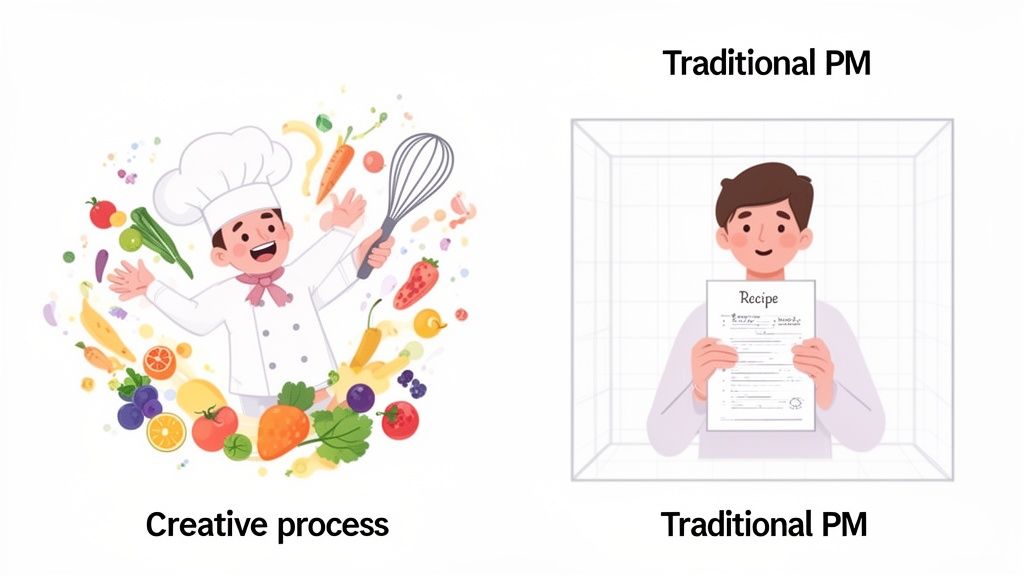
The Frustration of Mismatched Methods
When you try to jam a creative peg into a traditional project management hole, it’s frustrating for everyone. The fluid, dynamic nature of creative problem-solving just doesn't mesh with inflexible plans. This clash leads to some all-too-common headaches:
Endless Revision Cycles: You get vague feedback like "make it feel more modern," which means nothing without visual context. This kicks off a painful, inefficient cycle of back-and-forth guessing games.
Killed Momentum: Rigid approval gates and never-ending email chains bring progress to a grinding halt, completely disrupting the creative flow designers need to do their best work.
Misaligned Expectations: Stakeholders and designers are often coming from completely different planets. Without a shared visual language, it’s almost impossible to stay aligned on project goals, leading to major misunderstandings.
This mismatch really gets to the heart of the problem. If you want to see how we got here, it helps to look at the evolution of waterfall and agile project management strategies. Design is all about iteration, but if you don't have a system built for it, projects go off the rails fast.
The core issue is simple: creative work is not a straight line. It’s a loop of ideation, creation, feedback, and refinement. A successful management approach must embrace this cycle, not fight against it.
Redefining Project Management for Design
Good project management for design isn't about boxing in creativity; it's about building a strong container for it. It gives you just enough structure to keep projects on track, on time, and on budget, while still giving designers the breathing room they need to do amazing work. It’s about swapping rigid control for flexible guidance and pushing for clear, visual communication over confusing walls of text.
Get this wrong, and the risk of delays and budget overruns goes through the roof. Just look at public sector IT projects—they overrun their schedules 81% of the time, a huge jump compared to the 52% in private sectors. It’s no wonder the market for project management software that gets this is booming. The demand for better tools is real.
The Core Pillars of Modern Design Project Management
If you want to build a system that actually supports creativity instead of crushing it, good intentions aren't enough. You need a solid foundation. From my experience, effective project management for design really comes down to four core pillars. These aren't just abstract ideas; they're the practical, load-bearing walls that create a blueprint for a smoother, more predictable creative process. Get them right, and everything else just clicks into place.
The first, and maybe most important, pillar is having flexible workflows. Creative work is messy. It’s iterative. It’s definitely not linear. A rigid, step-by-step plan is guaranteed to shatter the moment a brilliant new idea pops up or a concept needs a total rethink. So, instead of trying to force designers into a strict timeline, modern approaches lean into this natural flow. This is where visual systems like Kanban boards are a lifesaver, letting teams track work from "To Do" to "Done" in a way that actually makes sense for creative development.
Embracing Agile Methodologies
Design teams do their best work when they can adapt on the fly. Methodologies borrowed from the software world, like Agile and its cousins, give us the perfect framework for this. They’re built around iteration, collaboration, and responding to feedback rather than sticking to a rigid plan made months ago. By breaking down huge projects into smaller, bite-sized pieces, teams can get feedback early and often, making tweaks along the way without derailing the whole train.
This adaptability is everything. For instance, instead of a "big reveal" after months of silence, an Agile design team might share progress every single week. This keeps stakeholders in the loop and ensures the final product is actually what they wanted, which massively cuts down on those dreaded last-minute surprises and costly re-dos. A huge part of this is also setting up a solid Digital Asset Management (DAM) workflow so all those creative assets stay organized and easy to find.
Not sure which methodology fits your team? Here’s a quick breakdown to help you decide.
Comparing Project Management Methodologies for Design Teams
Choosing the right operational framework can make or break a design project's success. While Agile, Scrum, and Kanban all come from the world of software development, each offers unique advantages and disadvantages when applied to the creative process. This table compares the three to help you find the best fit for your team's specific needs.
Methodology | Best For | Pros for Design Teams | Cons for Design Teams |
|---|---|---|---|
Agile | Projects with evolving requirements and a need for rapid iteration, like website redesigns or app development. | Emphasizes collaboration, flexibility, and customer feedback throughout the entire process. | Can be prone to scope creep if not managed carefully with a clear product vision. |
Scrum | Complex projects requiring structured, time-boxed sprints to deliver incremental progress. | Provides clear roles, regular check-ins (daily stand-ups), and a predictable rhythm. | The fixed-length sprints can sometimes feel too rigid for purely exploratory creative tasks. |
Kanban | Teams managing a continuous flow of tasks with varying priorities, such as a marketing design team. | Highly visual, limits work-in-progress to prevent burnout, and offers maximum flexibility. | Lacks the time-bound structure of Scrum, which may not suit all project types. |
Ultimately, the best choice depends on your project's complexity and your team's culture. Some teams even blend elements from different methodologies to create a hybrid approach that works just for them.
Fostering Crystal-Clear Communication
The second pillar is clear communication, and in the design world, that means visual and contextual communication. Vague feedback buried in long email chains is a project killer. I'm sure we've all seen notes like "make it pop more," which are completely useless without a specific reference. This is where the right tools become absolutely essential.
Real communication happens when feedback is tied directly to the design element you're talking about. Instead of trying to describe a change, a client or stakeholder can just point to the exact spot on a mockup and leave a comment. This simple shift gets rid of the guesswork, captures exactly what they mean, and turns vague ideas into tasks you can actually act on.
By ditching long, confusing email threads for contextual, on-page feedback, teams can slash their review cycles by up to 50%. It’s the difference between describing a location on a map and just dropping a pin.
Defining Roles and Choosing the Right Tools
Finally, it all comes down to defined roles and the right toolset. Everyone involved—the designer, the developer, the project manager, the client—needs to know exactly what they’re responsible for. That kind of clarity prevents confusion and makes sure everyone is accountable for their part.
Just as important is the tech that powers your workflow. The right tools don't just track tasks; they make collaboration easier and automate the boring stuff. Think about it: the global project management software market is expected to hit a massive $12.02 billion by 2030. And yet, only 23% of organizations actually use dedicated project management software. That’s a huge opportunity for teams to adopt tools that can cut through the communication chaos and bring all these pillars together.
Every single design project, no matter how buttoned-up the plan is, hits a few predictable bumps in the road. These aren't just tiny annoyances; they're the usual suspects behind busted budgets, blown deadlines, and teams pulling their hair out. But if you see them coming, you can build a system that snuffs out these fires before they even start.
Smart project management for design is less about frantic firefighting and more about fireproofing your entire process. The teams that really crush it don't just work harder; they work smarter. They know the common failure points and have a game plan for each. Let's break down the three biggest culprits and how to shut them down.
Taming Scope Creep
Scope creep is the quiet, creeping vine that strangles project timelines. It usually starts with a tiny, innocent-sounding request—"Could we just add one more button?"—and before you know it, a dozen untracked changes have completely derailed the project. Suddenly, your team is building features that were never in the original plan, and that deadline is just a speck in the rearview mirror.
The answer isn’t to just say "no" to every new idea. What you need is a real process for managing change.
Document Everything: Create a simple change request form. When a stakeholder wants something new, they have to fill it out, explaining what it is and why it's needed.
Assess the Impact: The project manager takes that request and figures out what it will do to the timeline, budget, and team's workload. This little step turns a casual "easy" request into a calculated business decision.
Get Formal Approval: Take that impact assessment to the decision-makers. If they give it the green light, then it gets officially added to the project scope and timeline.
This process drags scope creep out of the shadows and makes it a transparent, managed part of the project. It makes sure every single change is intentional and accounted for.
Defeating Ambiguous Feedback
"Can you just make it pop more?" I think every designer on earth has heard this one. Vague, subjective feedback is a nightmare to work with and creates those soul-crushing, endless revision cycles. It forces designers to play a guessing game about what stakeholders actually want, which is a massive waste of time and a huge morale killer.
The antidote here is context. Feedback has to be visual, specific, and literally attached to the thing you're talking about.
When feedback is given directly on a design element—like a comment pinned to a specific button on a live website—it eliminates all guesswork. The designer knows exactly what to change and why, turning a vague opinion into an actionable task.
This is exactly why visual feedback platforms like Beep exist. Instead of trying to describe a change in an email, a stakeholder can just click on the webpage and type, "Change this button color to our primary blue." The comment automatically grabs a screenshot, creating a crystal-clear task that can be tracked all the way to completion.
Overcoming Stakeholder Misalignment
When your stakeholders aren't on the same page, the project gets pulled in a dozen different directions at once. The marketing lead wants more promo space, the product manager wants a simpler user journey, and the CEO just saw something on a competitor's site they want to copy. This chaos leads to conflicting feedback and a design that tries to please everyone but ends up satisfying no one.
Getting everyone aligned means you need a single source of truth and a way for everyone to review things together. Instead of collecting feedback in siloed email chains and Slack DMs, bring everyone into one shared space.
As more teams work remotely, the pressure to stay aligned and efficient has gone way up. In fact, professional services firms saw their billable utilization crash to 68.9% in 2024, a long way from the healthy 75% benchmark. This just goes to show how badly teams need systems that turn feedback into trackable work. If you're curious, you can dig into more project management statistics that highlight this trend. A centralized visual feedback system lets the whole team see all the comments, which sparks real discussion and helps forge a single, unified path forward.
A Step-By-Step Workflow for Visual Feedback
Theory is great, but the real test is how your process holds up in the wild. Let's move from high-level concepts to a concrete, tactical workflow your team can start using today. This five-step process is all about killing ambiguity, slashing unnecessary meetings, and speeding up delivery by putting visual context front and center.
This structured workflow is the perfect antidote to the common headaches that derail creative projects.
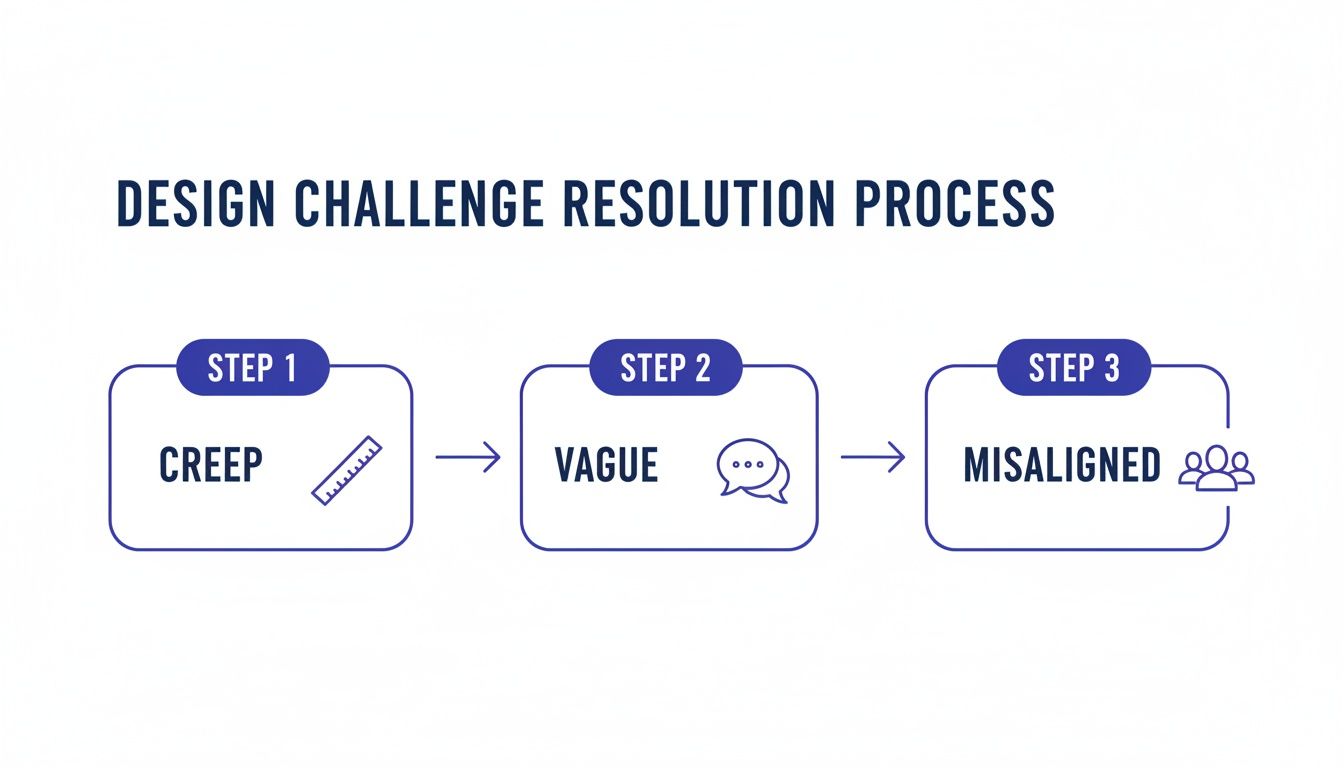
As you can see, a solid process directly tackles the big three: scope creep, vague feedback, and stakeholder misalignment. It creates a clear, repeatable system that everyone can follow.
Step 1: Share the Live Environment
The old way of doing things—passing around static PDFs or mockups—is painfully slow and often misleading. Designs can look and feel completely different once they’re actually live in a browser. The modern approach? Share a live staging link or the actual development environment for review.
This simple shift is a total game-changer. It lets stakeholders interact with the design just like a real user would—clicking buttons, testing flows, and seeing how animations actually perform. That immediate, real-world context is something a static image can never give you, and it’s the first step to getting feedback that’s truly valuable.
Step 2: Gather Contextual Feedback Directly on the Page
Once everyone has the link, the next step is to collect feedback in the most direct way possible. No more stakeholders taking screenshots, dropping them into a slide deck, or trying to describe an element in an email ("you know, the third button from the left under the main banner"). Instead, they should leave comments right on the page.
Visual feedback tools like Beep were built for exactly this. A team member can simply click on any element of the webpage and type their comment.
Each piece of feedback automatically captures a screenshot, browser information, and screen size, which gets rid of all the guesswork for designers and developers.
This method transforms vague opinions into specific, actionable instructions. "Make this text bigger" becomes a comment pinned directly to the headline in question, complete with all the technical metadata needed to replicate and fix the issue.
Step 3: Consolidate and Prioritize Tasks Automatically
As feedback pours in from multiple stakeholders, the next challenge is just managing it all. In a traditional setup, the project manager is stuck manually copying and pasting comments from emails and Slack into a spreadsheet or task board. It's not just tedious; it's a recipe for human error.
A modern workflow automates this whole step. When a comment is left using a visual feedback tool, it should automatically pop up as a new task in a centralized dashboard, like a Kanban board.
This gives the project manager a single source of truth for every requested change. From this central hub, they can:
Kill Duplicates: Quickly spot and merge identical requests from different people.
Clarify Ambiguity: Use the attached screenshot and metadata to understand the exact context of each comment.
Prioritize Work: Drag and drop tasks into columns like "To Do," "In Progress," and "Done" to build a clear work queue for the team.
Step 4: Assign and Execute with Full Context
With a prioritized list of tasks, the project manager can now hand out work with complete confidence. Each task is no longer just a one-line description; it’s a complete package of information. The person assigned gets the original comment, the annotated screenshot, and all the technical details they need to get started right away.
This is where integrations with tools like Jira, Asana, or Slack become incredibly powerful. A task created from a visual comment can be pushed directly into the development team's existing workflow.
It creates a seamless handoff, ensuring that the developer working on the fix has the exact same visual context as the person who reported it. This eliminates that frustrating back-and-forth and dramatically cuts down the time it takes to get things done.
Step 5: Review and Approve Final Changes
The final step is to close the loop. Once a task is completed, the developer or designer marks it as "Resolved." The system then automatically notifies the original commenter that the change is ready for them to check out.
They can click a link that takes them straight back to the live page to see the implemented change. If it’s good to go, they mark it as "Approved," and the task is officially closed. If it still needs a few tweaks, they can just reopen the task with a new comment, keeping the entire conversation and history all in one place.
This structured approval process provides a clear, auditable trail of all changes, ensuring nothing gets missed and the project keeps moving forward. By embracing these steps, teams can refine their processes with some of the top design feedback tools to enhance your workflow and ship better products, faster.
Defining Key Roles and Responsibilities for Clarity
Even with a flawless workflow, a design project can spiral into chaos if nobody’s sure who’s supposed to do what. Ambiguity is the enemy of momentum. When roles get fuzzy, you can bet tasks will get dropped, decisions will stall, and accountability will vanish into thin air. A huge part of project management for design is nailing down crystal-clear roles from day one.
Think of your project team like a surgical team in an operating room. Everyone—the surgeon, the anesthesiologist, the nurse—has a highly specific job. There's zero confusion about who holds the scalpel and who monitors the patient's vitals. That’s the level of clarity creative teams need to work efficiently, sidestep ownership squabbles, and push projects forward with real confidence.
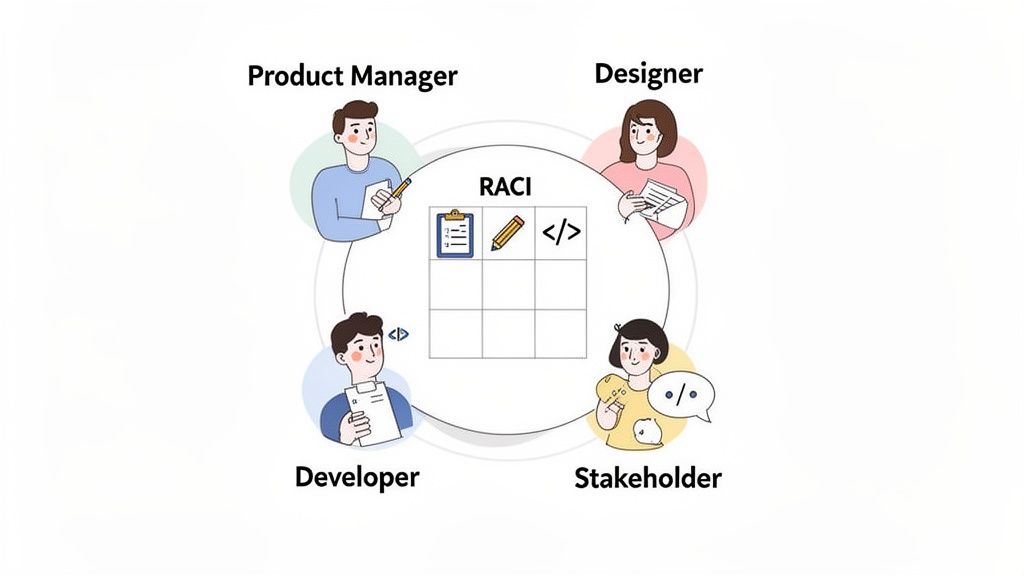
The Core Players in a Design Project
While every team looks a bit different, most design projects boil down to four key roles. Getting a handle on what each person does is the first step to building a team that just clicks.
The Product Manager (PM): I like to think of the PM as the project's strategic guide. They’re the voice of both the customer and the business, defining the "why" behind everything and making sure the final product actually hits its goals.
The Designer (UX/UI): This is the creative engine of the whole operation. The designer’s job is to translate all those user needs and business goals into an experience that’s intuitive, looks great, and just plain works.
The Developer: The developer is the builder who brings the entire vision to life. They’re the ones writing the code that turns a static design into something interactive and functional, all while keeping an eye on technical feasibility and performance.
The Stakeholder: This is a catch-all term for anyone with a real interest in the project's outcome—think executives, marketing leads, or even legal teams. Their main gig is to provide critical insights and sign off on key decisions.
Juggling all these personalities, especially stakeholders, is an art form in itself. For a deeper dive, check out this practical guide to stakeholder management in projects.
Mapping Responsibilities With a RACI Matrix
Defining roles is a fantastic start, but true clarity comes from mapping those roles to specific tasks. This is where a RACI matrix becomes your best friend. Seriously, it's an invaluable tool. RACI stands for Responsible, Accountable, Consulted, and Informed.
It’s basically a simple chart that visually lays out who does what for every major task or deliverable in the project.
A RACI matrix isn't just a document; it's a social contract for your team. It forces conversations about ownership early on, preventing confusion and finger-pointing when deadlines are looming.
Here’s what each of those letters means in the real world:
Responsible: This is the person (or people) who actually does the work.
Accountable: This is the one person who ultimately owns the outcome. They have the final say, and you should only ever have one accountable person per task to avoid bottlenecks. Trust me on this.
Consulted: These are the experts you pull in for their input. It’s a two-way street—you talk with them before a decision is made.
Informed: These are the folks you keep in the loop. It’s a one-way communication to let them know a decision has been made or a milestone has been hit.
To show you what I mean, here's a quick look at how a RACI matrix might be set up for a typical web design project.
RACI Matrix for a Typical Web Design Project
Task/Phase | Product Manager | UX/UI Designer | Developer | Stakeholder |
|---|---|---|---|---|
Discovery & Research | Accountable | Responsible | Consulted | Consulted |
Wireframing | Consulted | Accountable | Informed | Informed |
UI Mockups | Accountable | Responsible | Consulted | Consulted |
Prototype Development | Consulted | Responsible | Accountable | Informed |
Final Design Review | Accountable | Responsible | Consulted | Consulted |
Development Handoff | Responsible | Accountable | Responsible | Informed |
Feature Development | Consulted | Consulted | Accountable | Informed |
UAT & QA Testing | Accountable | Responsible | Responsible | Consulted |
By hammering out a RACI chart during the project kickoff, everyone knows exactly where they fit in at every stage. This simple framework brings much-needed structure to collaboration, ensuring the right people are involved at the right time—without drowning everyone in meetings they don't need to be in.
Bringing It All Together
So, we've walked through the ins and outs of project management for design, and it all comes back to one simple truth: success means getting flexible, visual, and collaborative. We've seen firsthand how stiff, old-school methods just create headaches, endless back-and-forth, and teams that are just plain burnt out. The workflows and roles we've talked about are your way out of that mess, letting you focus less on ticking boxes and more on sparking real creativity.
When you start moving feedback directly onto the design canvas, you kill the confusion that lives in long email threads and messy spreadsheets. It's a game-changer. Vague comments become clear, actionable tasks. For anyone working remotely or in a hybrid setup, this kind of contextual communication isn't just a nice perk—it's absolutely essential to keep projects moving and everyone on the same page.
Your Next Move
The last step is just to go for it. Ditch the chaotic spreadsheets and siloed chats that are holding your team back. By putting these strategies into play, you’re not just managing tasks; you’re building a space where creativity and productivity can actually coexist. Think of all the hours you'll save and the better work you'll ship.
The goal isn't just to manage projects. It's to build a system where great design can happen faster and with way less frustration for everyone.
Ready to find the right platform to make it all happen? A great place to start is by checking out some of the top visual project management tools for 2025. Taking this step is more than just adopting a new tool; it's a real investment in a more creative, efficient, and collaborative future for your team. You're committing to less friction and more time spent on what really matters—delivering incredible design that hits the mark every time.
Got Questions? We've Got Answers
When you're trying to wrangle design projects, a few questions pop up time and time again. It’s totally normal. Getting a handle on these key issues is the difference between a smooth-sailing project and one that’s constantly hitting roadblocks. Let's clear up some of the most common head-scratchers.
What’s the Best Project Management Style for Design Teams, Anyway?
Look, there's no magic bullet that fits every single team, but I've seen most design squads feel right at home with Kanban. Why? Because it’s visual and super flexible. A Kanban board lets you see your work moving from "To Do" to "Done," which just clicks with how creative projects flow.
Creative work rarely fits into the neat, two-week boxes of a Scrum sprint. Kanban respects that. That said, you can't ignore the core ideas of Agile. The whole mindset of collaboration, making steady progress, and being ready to pivot is absolutely essential for any design project worth its salt.
The sweet spot is usually a mix: the visual flow of Kanban combined with the collaborative, flexible spirit of Agile. You get just enough structure to keep things on track without crushing creativity.
How Can I Stop Getting Vague Feedback from Stakeholders?
If you're tired of hearing "I just don't like it," it's time to change the way you ask for feedback. The secret is to make ambiguity impossible. Ditch the long email chains asking for "general thoughts" and start using tools that force people to be specific. A visual feedback platform is your best friend here.
Think about it: stakeholders can literally click on any part of a website or mockup and drop their comment right there. It’s simple, but it completely changes the game. Their feedback is instantly tied to a specific element, in a specific context.
A fuzzy comment like "the button feels weird" becomes a crystal-clear task attached to the exact button in question. Even better, these tools automatically grab a screenshot and technical details like browser and screen size, so you're never left guessing what "this section" they were even looking at.
What KPIs Should I Actually Be Tracking for Design Projects?
Sure, budget and deadlines matter, but for design projects, you need to look a little deeper to see what’s really going on. Here are the metrics that tell the real story of your creative process:
Number of Revision Cycles: If this number is high, it's a huge red flag. It usually means the initial brief was fuzzy or the feedback you're getting is all over the place. Fewer cycles? That’s a sign of a tight, efficient process.
Time from Feedback to Implementation: This one’s a straight-up measure of your team’s agility. How fast can you take what a stakeholder says and turn it into a real change? The shorter, the better.
Stakeholder Satisfaction: You can track this with a super simple survey after the project wraps. It’s the ultimate gut check on whether you managed expectations and delivered on your promises.
Task Completion Rate: Keeping an eye on how many tasks get done in a given week or month helps you spot bottlenecks before they turn into full-blown delays.
Ready to kill ambiguous feedback and get your design projects moving faster? Beep lets everyone leave visual, contextual comments directly on any live website. It turns feedback into clear, actionable tasks in a snap. You can get your review process sorted in under a minute. Try Beep for free today!
I’ve found design projects run smoother when you treat structure as support, not control. On one branding project, we switched to visual feedback and short iterations, and suddenly revisions dropped a lot. It felt similar to casually checking Peoplesmart before making a decision, clear, contextual input saves time. Designers stayed creative, but we still had direction. That balance between freedom and clarity is what really keeps projects moving without burning everyone out or overcomplicating simple decisions.