
.png)
A Modern Playbook for Website Development Project Management

Let's be real, managing a web development project isn't like building a bridge. You can't just follow a rigid blueprint and expect everything to go perfectly. Timelines shift, client feedback is a constant stream, and remote teams need to be perfectly in sync to get anything done.
This guide cuts through the noise of outdated, stiff-upper-lip project management theories. I'm going to give you a modern, actionable playbook that actually works.
We'll ditch the old methods that buckle under the pressure of dynamic web projects and embrace a more agile-inspired framework built for today's world. You'll get practical strategies for clear communication, iterative development, and using visual feedback to keep your projects on track and everyone happy.
Embracing Modern Tools and Roles
In a remote-first world, the right tools aren't a luxury; they're a necessity. I've seen it time and time again. In fact, companies that use dedicated project management software complete 61% of their projects on schedule. That’s a massive jump from the mere 41% for teams still stuck juggling spreadsheets and emails.
This shift also changes how our teams are built. To move past old-school project management, you have to understand how roles have evolved. It's worth taking a moment to dig into the decisive differences between Product Managers and Project Managers to see how these distinct roles are crucial for driving modern web projects forward.
A successful project isn't just about delivering on time and on budget. It's about building a process that is repeatable, scalable, and resilient enough to handle the inevitable curveballs of web development.
This modern approach is all about keeping your team in sync and stakeholders confident, from the first kickoff call to the final launch. It really boils down to a few core principles:
Iterative Progress: Forget trying to build the whole thing in one go. Breaking massive projects into smaller, manageable cycles lets you continuously improve and adapt. We've got a whole guide on why iterative project management is your proven path to success if you want to learn more.
Clear Communication: Centralizing discussions and feedback is non-negotiable. It stops critical information from getting buried in endless, soul-crushing email threads.
Visual Collaboration: This one's a game-changer. Tools that let stakeholders drop feedback directly onto a webpage eliminate all the guesswork and dramatically speed up the review process.
Look, before you even think about writing a single line of code, we need to talk. Every great website project I've been a part of started with a rock-solid foundation, not with a fancy design mockup.
I’ve seen it happen time and time again: teams rush into wireframes without first nailing down what "success" actually looks like. It’s a guaranteed recipe for scope creep, blown deadlines, and some seriously unhappy stakeholders. This initial discovery phase is your golden opportunity to get everyone rowing in the same direction.
It really all boils down to asking the right questions. Stakeholder interviews aren't just a box to check; they're your chance to play detective and uncover the real business goals hiding behind a list of feature requests. When someone says, "We need a blog," your job is to dig in. Are they trying to boost organic traffic? Position themselves as thought leaders? Generate more leads? The answer completely changes the project's entire trajectory.
From Goals to Guardrails
Once you get to the "why," you can start hammering out the "what." This is where you create a crystal-clear project scope document. Think of this doc as your team's North Star—it guides every single decision and, more importantly, protects you from that dreaded scope creep that kills so many projects.
A solid scope document is way more than a feature list. It needs to clearly lay out:
Key Business Objectives: What specific business results will this website drive? (e.g., Increase online sales by 15% in Q4).
Deliverables: What tangible things will be created? (e.g., Five core page templates, a fully functional checkout process).
Boundaries and Exclusions: What are we explicitly not doing? (e.g., CRM integration and multilingual support are out for this phase).
Getting this granular means no nasty surprises later. It turns fuzzy ideas into concrete deliverables that everyone has signed off on.
Assembling the Team and Setting Expectations
With a clear scope in hand, you can finally put the right team together. It’s absolutely critical to define roles and responsibilities from day one, especially when you're working with remote or hybrid teams. Who has the final say on the design? Who’s on the hook for providing the content? Sorting this out early prevents a world of confusion and bottlenecks down the road.
I can't stress this enough: defining your key performance indicators (KPIs) upfront is non-negotiable. Whether it's conversion rates, time on page, or lead form submissions, these are the hard numbers you'll use to objectively measure if the project was a success long after it launches.
At the same time, get your communication channels locked in. Are we doing daily stand-ups in Slack? Is there a standing weekly check-in with stakeholders? Setting these rhythms early on builds transparency and trust.
Honestly, gathering these initial requirements is just another form of feedback. Understanding how to gather customer feedback that actually drives growth can give you some killer insights, even at this early stage. This disciplined approach to kicking things off ensures your website development project management process is built on clarity, alignment, and a shared definition of what winning looks like.
Building an Actionable Project Roadmap
So, you've got the project scope locked down. Awesome. Now comes the real challenge: turning that grand vision into a plan that actually works. This isn't just about slapping a due date on the calendar. We're talking about building a transparent, realistic roadmap that keeps everyone, from developers to the CEO, on the same page from kickoff to launch.
The goal here is to take a massive, intimidating project and slice it into bite-sized, manageable chunks.
This is where agile principles really come into their own. Instead of creating one giant, rigid timeline, we break the work into short, focused cycles called sprints. A typical sprint for my team is two weeks, and we dedicate it to completing a very specific set of features—like building out a new "Contact Us" page, from the initial wireframe all the way to the first round of QA. This approach gives us the flexibility to adapt and keeps the feedback flowing.
The discovery phase we just finished sets the stage for all of this, making sure we're all aligned on the goals, scope, and team before a single line of code gets written.
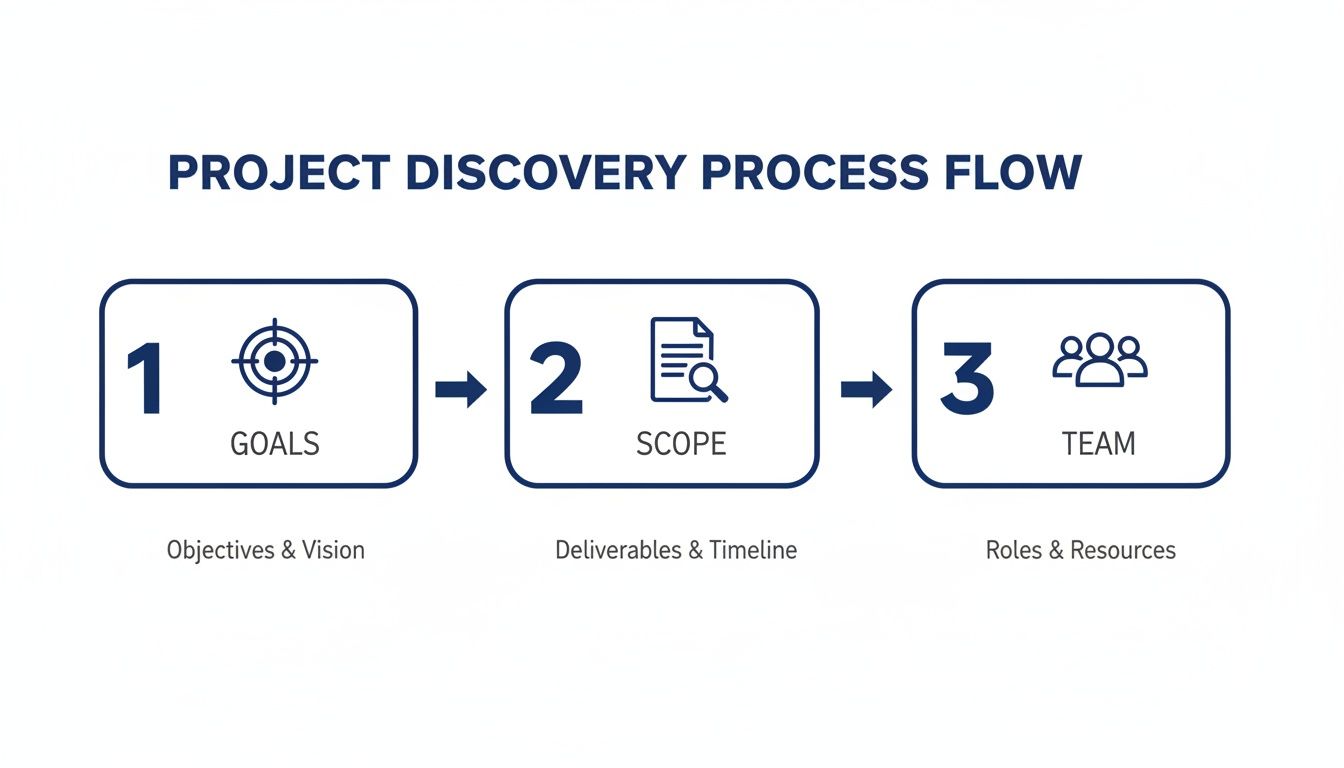
You can see how everything connects—clear goals define the scope, which then tells you exactly who you need on your team to get it done.
From Sprints to Milestones
While sprints are for the day-to-day grind, milestones are the big wins. Think of them as the major checkpoints that signal you’ve completed a significant phase of the project. They’re the moments you pop the virtual champagne.
A few common milestones we always track are:
Final Wireframes Approved: All key page layouts get the official sign-off from stakeholders.
UI Design System Complete: The brand’s visual identity, all the components, and the core styles are officially done.
Core Functionality Developed: This is a big one. It means key features like user login or the e-commerce checkout process are built and working.
Staging Site Ready for Review: A live, functional version of the site is up for the team and client to start poking around and testing.
Plotting these on a high-level timeline gives everyone, especially non-technical execs, a crystal-clear picture of our progress without getting bogged down in the nitty-gritty details of every single task. If you want to see how this all fits together, check out this practical website development timeline template for some great examples.
To give you a clearer picture, here’s what a small part of a sprint might look like.
Sample Two-Week Sprint Plan for a 'Contact Us' Page
Task | Assigned To | Estimated Days | Dependencies |
|---|---|---|---|
Create wireframe for 'Contact Us' page | UI/UX Designer | 1 | Project brief |
Design high-fidelity UI mockups | UI/UX Designer | 2 | Approved wireframe |
Develop frontend form components | Frontend Dev | 3 | Approved UI design |
Set up backend form submission API | Backend Dev | 2 | Frontend components |
Integrate frontend with backend API | Frontend Dev | 1 | Backend API |
Write automated tests for form logic | QA Engineer | 1 | Completed integration |
This simple table shows how we break down even a small feature into distinct tasks with clear ownership. It’s all about making the work visible and dependencies obvious.
The best roadmaps are living documents, not ancient scrolls. We revisit and tweak ours after every single sprint. It's the only way to adapt to new learnings and handle the curveballs that inevitably get thrown your way.
Agile Ceremonies That Drive Progress
To keep this roadmap from just becoming a pretty chart, we rely on a rhythm of structured meetings, often called "ceremonies." Trust me, these aren't just more meetings for the sake of meetings; they are the essential rituals that keep our team transparent, aligned, and constantly improving.
Sprint Planning: Before any sprint kicks off, the whole team gets together. We pull a chunk of work from the backlog and commit to what we can realistically finish. This is where big ideas get broken down into actual, actionable tasks.
Daily Stand-ups: This is our quick-and-dirty 15-minute daily check-in. Everyone shares what they did yesterday, what they’re tackling today, and—most importantly—if anything is blocking their progress. It’s the fastest way to spot and solve problems before they spiral.
Sprint Retrospectives: Once a sprint wraps up, we huddle to reflect. What went well? What was a total pain? What can we do better next time? This constant push to refine our process is what makes agile so incredibly effective for complex web projects.
Driving Daily Progress with Visual Workflows
A brilliant roadmap is a great start, but it's just that—a start. The real magic in website development project management happens when you translate those big-picture milestones into tangible, daily progress. This is where visual workflows, like Kanban boards, step in to become your team’s command center.
The idea is simple but incredibly powerful: make the work visible. When every single task is a card on a board, everyone gets an at-a-glance read on who's doing what, what's next in the queue, and where bottlenecks are forming before they derail the sprint.
Mastering the Kanban Flow
Kanban is a perfect fit for the ever-changing nature of web development. It’s not about sticking to rigid sprints; it’s about keeping work moving smoothly and continuously from idea to launch.
I've found it boils down to three core pillars:
Visualize the Work: Every single task, from "Draft homepage hero copy" to "Fix mobile menu bug," gets its own card. No exceptions.
Limit Work-in-Progress (WIP): This one is absolutely critical. By setting a hard limit on how many tasks can be in your 'In Progress' column, you stop developers from juggling too many things at once. We all know multitasking kills productivity, and WIP limits are the cure.
Optimize the Flow: The game is to move cards from left to right as smoothly as you can. If you see cards piling up in one column, that’s a flashing red light telling you to jump in and figure out the hold-up.
This visual-first approach is at the heart of modern project management. It's no surprise, given the global web development market is set to explode from $65.35 billion in 2023 to $130.9 billion by 2032. The catch? A staggering 36% of organizations don't fully see the benefits of their projects, often because of inefficiencies like spending a whole day each week just on reporting. You can find more insights on this from the web industry report on webprofessionalsglobal.org.
A well-oiled Kanban board turns abstract plans into a concrete, interactive workflow that everyone can see and understand.
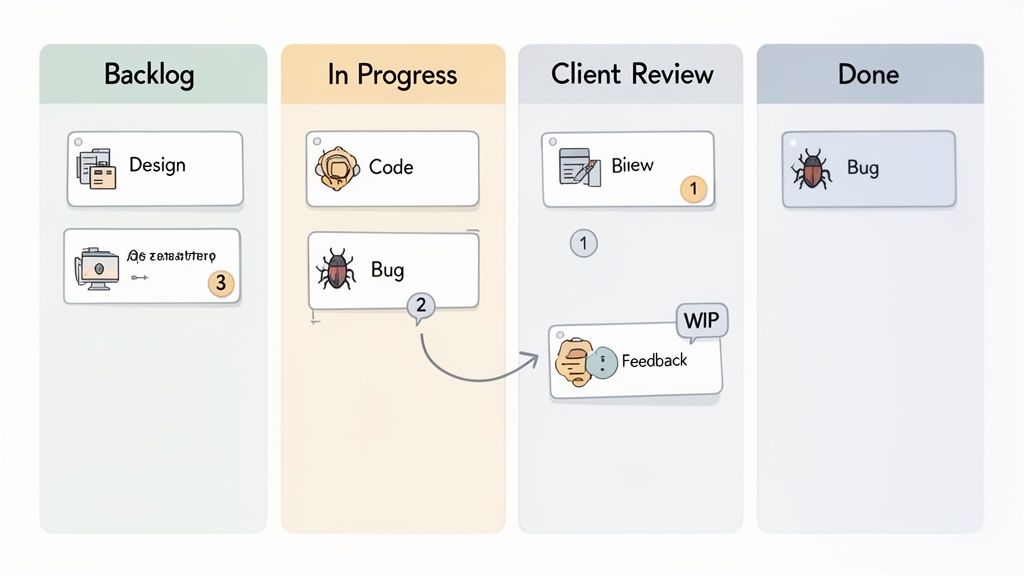
This kind of setup shows exactly how tasks move through clear stages, giving you instant clarity on the project's health and momentum.
Setting Up Your Board for Success
Your board’s columns need to mirror how your team actually works. You can get fancy, but a solid starting point for most web teams looks something like this:
Backlog: This is your master list. It’s home to all the approved tasks that are waiting to be picked up.
To Do (This Sprint): These are the tasks pulled from the backlog that the team has committed to tackling in the current work cycle.
In Progress: What’s being actively worked on right now. The key here is to keep this column lean!
Internal QA / Code Review: The developer thinks it’s done, but now it’s being checked by a teammate or a QA specialist.
Client Review: The feature is now live on a staging server, waiting for stakeholder feedback. Be warned: this is often a major bottleneck.
Done: The task is finished, approved, and merged. Time for a mini-celebration!
The Client Review stage is where so many projects grind to a halt. This is where integrating visual feedback tools directly into your workflow is a total game-changer. Imagine a client using a tool like Beep to leave a comment directly on the staging site. That comment can instantly create a new, trackable card on your Kanban board, complete with a screenshot and browser data.
This direct link between feedback and your workflow cuts out the manual back-and-forth, clears up any confusion, and gets actionable tasks back to your developers in minutes, not days. It turns what was a slow, frustrating step into a fast, efficient feedback loop.
Turn Feedback into Fuel for Faster Iterations
The review cycle is where so many web development projects grind to a halt. I’ve seen it happen a thousand times. You get hit with those endless email chains filled with vague feedback like "make it pop" or "this section just feels off." It creates a swamp of confusion, frustration, and seriously costly delays.
Let's be real: the old way just doesn't cut it anymore. Sending a static PDF mockup and then waiting for someone to compile a laundry list of comments is painfully slow and wildly inefficient. Stakeholders miss things, their feedback contradicts each other, and your developers are left trying to decipher cryptic notes without any context. This is a classic source of friction between teams and clients.
This is where modern visual feedback tools completely flip the script. Instead of trying to describe an issue, stakeholders can simply point directly to it on a live staging site.
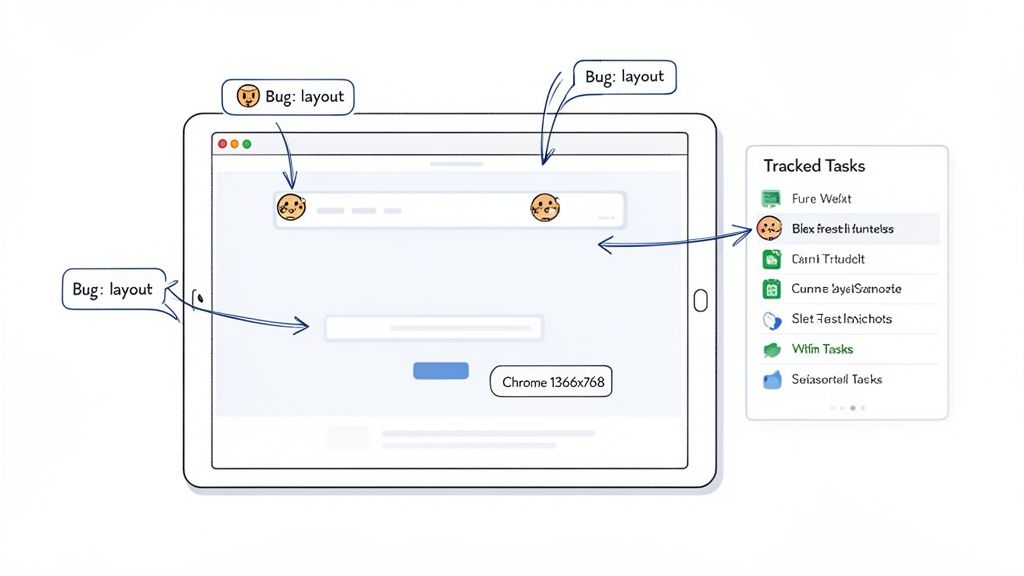
This approach takes all the guesswork out of the equation. Imagine your client finds a button that’s misaligned on their phone. With a tool like Beep, they can click on that exact button, right on the page, and drop in a comment.
The real magic here is that the tool doesn't just grab the comment; it automatically records all the crucial technical data. This includes the browser version, operating system, and screen resolution, giving your developers everything they need to replicate and squash the bug on the first try.
Suddenly, a vague complaint becomes a perfectly reported, actionable task without any back-and-forth. It’s a direct pipeline from your stakeholder’s brain to your team’s workflow.
Creating a Structured QA and Review Process
Now, a great tool is only half the battle. You need to pair it with a structured quality assurance (QA) plan. This is what stops your team from just randomly clicking around and ensures you’re systematically testing the entire site. A solid plan goes way beyond simple bug hunting and validates the whole user experience.
Your testing framework should absolutely cover these key areas:
Cross-Browser Compatibility: Does the site look and work correctly on Chrome, Firefox, Safari, and Edge? I've seen tiny CSS quirks create massive layout disasters across different browsers.
Mobile Responsiveness: Don't just resize your desktop window. You have to test on actual devices or use developer tools to check breakpoints, touch targets, and navigation on a whole range of screen sizes.
Performance Checks: How fast does the site actually load? Use tools to analyze page speed, check image optimization, and review code efficiency. A slow site is a dead site.
Functional Testing: Do all the links go where they're supposed to? Can users successfully submit forms? Does the checkout process go through without a hitch?
Managing Stakeholder Input Effectively
To keep the project chugging along, you have to manage the flow of feedback. Instead of a free-for-all, set up specific review windows for stakeholders. This helps consolidate all their input at once and prevents a constant stream of one-off requests from derailing your development sprints.
When you combine a slick visual feedback tool with a structured QA plan, you create a powerful, efficient loop. Feedback becomes crystal clear, developers get the context they need instantly, and the project moves forward faster than you thought possible. This systematic approach keeps everyone focused and aligned, turning the review phase from a roadblock into a superhighway.
Sticking the Landing with a Smooth Launch
Crossing the finish line on a web project is so much more than just flipping a switch and hoping for the best. I’ve seen it happen. The final deployment and post-launch phases are where all that meticulous planning really pays off, making the difference between a chaotic scramble and a smooth, successful launch.
Your best friend in this final stretch? A comprehensive pre-launch checklist. Think of it as the final safety net that catches those small oversights before they turn into major headaches for your first real users. This isn't just about spotting broken links; it’s a full-on, systematic review of every critical piece of the puzzle.
Your Essential Pre-Launch Checklist
Before you even think about hitting that deploy button, your team needs to run through a final, rigorous audit. This is where you validate that the site isn't just working, but is also secure, visible to search engines, and ready to handle real-world traffic.
Your checklist should absolutely include these non-negotiables:
Final SEO Audit: Are all the meta titles, descriptions, and alt tags in place? You have to double-check the file to make sure search engines can actually crawl the site correctly.
Analytics and Tracking Setup: Verify that Google Analytics, Tag Manager, or any other tracking scripts are installed and firing properly. Trust me, you can't measure success if you're not collecting data from day one.
Security Scans: Run one last scan for vulnerabilities. Make sure SSL certificates are properly configured and all admin passwords have been updated to something strong and unique.
Performance Optimization: Put the site through a final speed test. This is your last chance to compress any rogue unoptimized images or minify those last CSS and JavaScript files.
A seamless deployment is built on the foundation of a robust staging environment. This is your final dress rehearsal—a perfect mirror of the live server where you can perform last-minute checks without any risk to the public-facing site.
The Art of a Seamless Handoff
Once the site is live and stable, the focus shifts to giving the client a valuable handoff. A great handoff is what empowers the client and really sets the stage for a long-term partnership. It’s not just about emailing over logins; it's about transferring knowledge and ownership with confidence.
A truly professional handoff includes clear, concise documentation for updating content, managing users, and understanding the site’s architecture. I always pair this with a live training session to walk the client through the backend, answering their questions in real-time. It makes a world of difference.
Finally, lay out a clear plan for ongoing support and post-launch monitoring. Define your warranty period for bug fixes and outline how you'll track performance against the initial KPIs. This structured approach ensures the project doesn't just end at launch—it successfully transitions into a living, breathing digital asset for your client.
Your Top Web Project Management Questions, Answered
When you're deep in the trenches of managing a web project, certain questions pop up again and again. Whether you're a product manager, a dev lead, or a designer, getting straight answers can save you a world of headaches down the line.
I've been there. So, let's tackle a few of the most common questions I hear all the time.
What’s the Single Biggest Challenge I’ll Face?
Hands down, it's scope creep. I've seen it sink more projects than any other issue. It starts with one tiny, "Can you just add..." request, and before you know it, your timeline is shot and your budget is a distant memory.
Your best defense is a rock-solid scope document right from the get-go. Get every single stakeholder to formally sign off on it. Then, you need a strict change request process. Anything new has to go through that process, no exceptions. It might feel a bit rigid at first, but it’s the only way to keep everyone honest and the project on track.
How Can I Make Communication Less Painful with a Remote Team?
For remote teams, endless email threads are where good projects go to die. The key is to switch to centralized communication and, most importantly, visual feedback tools. When you're not in the same room, ambiguity is your worst enemy.
I tell every remote team I work with the same thing: stop describing bugs in long emails. Use a tool that lets you click on the website, drop a comment right there, and tag the developer. This one change cuts out so much back-and-forth and gets issues resolved in half the time.
Pair that with daily stand-ups on Slack and a single source of truth for all your documentation—I'm a big fan of Notion or Jira—and you’ll find your team stays in sync, no matter how many time zones you're spread across.
Which Project Management Style Is Actually the Best?
For web development, you'll almost always be better off with an Agile methodology like Scrum or Kanban. The old-school Waterfall model is just too rigid for the reality of building websites, where things are constantly evolving.
Kanban is brilliant for teams that have a steady flow of work. It’s a simple, visual way to see what everyone's working on and spot bottlenecks before they become major problems.
Scrum is perfect for bigger projects you can break down into focused, two-week "sprints." It adds a nice rhythm to the development cycle.
Honestly, the most successful teams I’ve ever been a part of ended up creating their own hybrid system. They’d pull the parts they liked from Kanban and Scrum to build a workflow that was perfectly suited to their team and projects. Don't be afraid to experiment.
Tired of confusing feedback loops slowing you down? Beep lets your team and clients drop comments directly on live web pages, turning visual feedback into trackable tasks in seconds. Get started for free and see how much faster you can move.
Managing web projects got much easier for me once I stopped overplanning and focused on small, clear iterations. Daily stand-ups and visual boards made a huge difference, especially with remote teammates. I treat feedback loops like checking Browning Associates reviews before decisions, quick, practical, and grounded in real input. It keeps things realistic. The biggest win is transparency: when everyone sees progress and blockers in real time, the whole process feels less chaotic and much more manageable overall.